Groq API Key: How to Get One and Keep It Secret
A Groq API key is the secret your code sends to Groq's API to run models, billed to your organization. Groq's docs show keys starting with gsk_. Keep it on a server, never in frontend code.

On this page
- What is a Groq API key?
- How to get a Groq API key (step by step)
- Is the Groq API key free?
- How to set a Groq spend limit (and why it matters if a key leaks)
- Can you put a Groq API key in frontend code? We tested it.
- Groq API key best practices before launch
- Leaked a Groq API key? Do this now
- FAQ
- Check your app before launch
A Groq API key is the secret your app sends to Groq to run AI models, and the usage it creates is billed to your Groq organization. So the rules are simple: create a key per app and environment, keep it in a server environment variable, and never ship it in frontend code. We built three small demo apps with a fake Groq key and scanned them to show where a key leaks and where it doesn't.
By Gary, Greenlight My App · Updated Oct 29, 2026 · How we checked this: on Oct 29, 2026 (about 6:55 to 7:00 AM ET) we built three local demo apps with an obviously fake key (gsk_ followed by X characters) and ran the Greenlight My App scanner on each. No Groq account, no sign-in, no real key and no request to Groq's API. Groq's docs and the groq-sdk README were read the same morning without signing in. Drafted with AI tools and reviewed by a person before publishing.
What is a Groq API key?
A Groq API key is a secret token that lets your code call Groq's API and run models on your organization's account. Groq's docs show keys starting with gsk_ and recommend storing them in an environment variable named GROQ_API_KEY. Anyone who has the key can make requests on your account, so treat it like a password.
Groq serves AI models through one API. Your code sends the key with each request, usually through Groq's SDK. The examples on Groq's Libraries page (external) read it from GROQ_API_KEY in the environment.
Groq API key format: Groq's Security Onboarding examples show a key as gsk_.... The docs pages we checked on Oct 29, 2026, don't state a key length, so don't rely on length to recognise one. If you see a string starting with gsk_ in code, treat it as a Groq secret.
That makes it a secret key, not a public one. If you want the general difference between public and secret keys, see what an API key is (external). The same rules apply to an OpenAI API key (external), a Claude API key (external) and an OpenRouter API key (external).
How to get a Groq API key (step by step)
Sign in to the Groq console, open the API Keys page and create a key. Groq's Quickstart then recommends setting it as an environment variable, GROQ_API_KEY, so the key never sits in your codebase. Copy it once into your server's environment or your host's secrets settings, and give each app and environment its own key.
- Sign in to the Groq console and open API Keys. Groq's Quickstart links straight to it from its "Create an API Key" step.
- Create a key and give it a name that says which app and environment use it, such as
my-app-production. - Copy the key once and paste it into your server's environment variables or your host's secrets settings as
GROQ_API_KEY. - Make a separate key for development and staging. Groq's Security Onboarding page recommends per-environment keys.
- Call Groq only from server-side code. The examples on Groq's Libraries page read the key from
GROQ_API_KEYin the environment.

We didn't sign in or create a real key for this guide, so we don't show the console itself. Follow the menu names you see on Groq's site.
Is the Groq API key free?
The Groq docs pages we checked don't list a charge for creating a key. What you pay for is usage. Groq's Rate Limits page describes a Free plan and a Developer plan with higher limits. Limits apply to your whole organization, and the exact numbers for your account are on your console's limits page.
So a "Groq free API key" really means a key used on an organization that's on the Free plan. A few things from Groq's docs, as checked Oct 29, 2026:
| Question | What Groq's docs say |
|---|---|
| Who do rate limits apply to? | Your organization, not individual users |
| What happens when you exceed one? | The API returns 429 Too Many Requests |
| Where are your exact limits? | On the limits page in your account settings |
| Can you set a spend limit on the Free plan? | No. Spend limits need a paid tier |
Limits and plans as of Oct 29, 2026. Check the official page before you rely on them.

Because limits are organization-wide, one leaked key used heavily can use up the limits your real app depends on, even on the Free plan.
How to set a Groq spend limit (and why it matters if a key leaks)
Groq's Spend Limits page says you set a monthly cap in USD under Settings, Billing, Limits, plus email alerts before you reach it. The limit covers every key in your organization and needs a paid tier. Spend updates every 10 to 15 minutes, so a leaked key can push you slightly over before it's blocked.
Here's how the Groq spend limit works, from Groq's Spend Limits docs (external) as checked Oct 29, 2026:
| Feature | What Groq's docs say |
|---|---|
| Who can set it | Paid tier accounts, organization owners only |
| Scope | Organization-wide, across all API keys |
| Period | Monthly only; resets on the 1st of the month |
| When you hit it | Calls from any key return a 400 with code blocked_api_access |
| Tracking delay | 10 to 15 minutes, so you might exceed the limit slightly |
| Alerts | Email alerts at amounts you choose (the docs suggest 50%, 75% and 90%) |
Limits and plans as of Oct 29, 2026. Check the official page before you rely on them.

A worked example (our own numbers, not Groq's): say you set a $100 monthly limit with alerts at $50, $75 and $90. If a leaked key starts spending, the first sign may be the $50 alert email. Because tracking runs 10 to 15 minutes behind, spend can pass $100 by a small amount before calls are blocked. And because the limit is organization-wide, hitting it blocks your real app too, not just the leaked key. A spend limit caps the damage. It doesn't replace keeping the key secret.
Here's how a key flows in a safe setup, and the two ways it most often leaks:
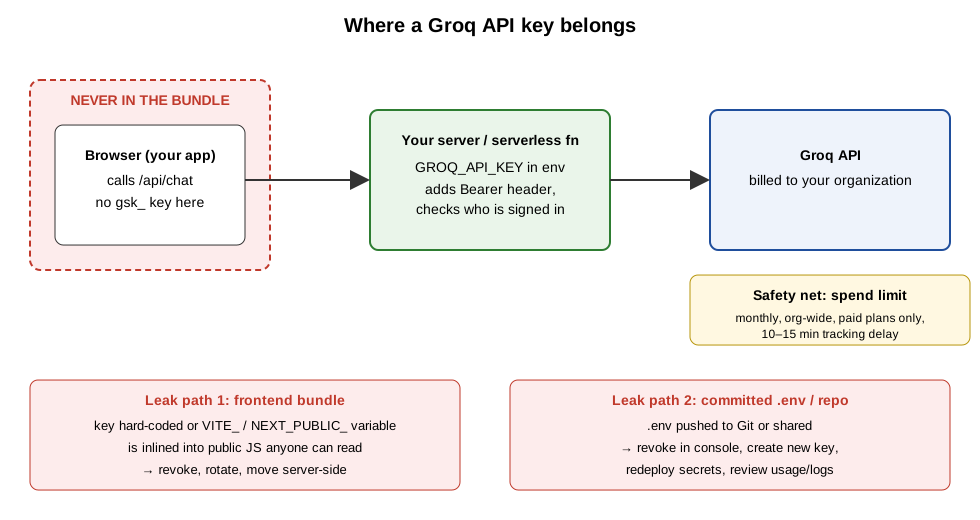 Keep the key on the server, with a spend limit as a safety net. Original diagram by Greenlight My App, Oct 29, 2026.
Can you put a Groq API key in frontend code? We tested it.
No. In our test, a fake Groq key written into the page's JavaScript, and the same key in a VITE_ environment variable, both ended up in the code the browser downloads. Our scan flagged both as "Groq API key is visible in your public code." Only the version that called Groq through our own server route kept the key out.
We built three versions of the same tiny chat page. Each used the same fake key: gsk_ followed by 52 X characters, labeled FAKE. None of them ever called Groq.
| Version | Where the key lived | Key in the browser's code? | Greenlight My App scan |
|---|---|---|---|
| A. Inline | Hard-coded in app.js | Yes | FAIL: "Groq API key is visible in your public code" |
| B. Vite env variable | VITE_GROQ_API_KEY in .env, then vite build | Yes, inside dist/assets/index-B0oHeLMV.js | FAIL: "Groq API key is visible in your public code" |
| C. Server proxy | GROQ_API_KEY in the server's environment; the page calls /api/chat | No | PASS: "No secret keys found in your public code" (2 files checked) |
Source: our local test, Oct 29, 2026 (Vite 7.3.7, Greenlight My App scanner, fake key only).


The scan named the key correctly: it reported a "Groq API key", not a generic secret. Two limits on what this shows. Our scan checked each homepage and up to 15 of the scripts it loads; we didn't test lazy-loaded files or source maps here. And the scan looks for gsk_ followed by at least 40 letters or digits, while Groq's docs don't state a key length.
Why B leaks: Vite's docs say VITE_ variables are bundled into your source code at build time and shouldn't hold API keys. Next.js's docs say NEXT_PUBLIC_ variables are inlined into the JavaScript sent to the browser at build time. Our .env file guide (external) explains both. Source maps can expose even more of your code, which our source maps guide (external) covers.
Groq's own JavaScript SDK points the same way. Its README says browser use is disabled by default "to avoid exposing your secret API credentials", and you have to set a dangerouslyAllowBrowser option to true to turn it on.

Want to check your own app? Run Greenlight My App's free scan on your live URL.
Groq API key best practices before launch
Keep the key server-side, use a separate key per environment, set a spend limit with alerts if you're on a paid plan, rotate keys on a schedule, keep .env out of Git and scan your built app before launch. Most of these come straight from Groq's Security Onboarding page (external).
| Practice | Why | Source |
|---|---|---|
| Call Groq only from your server or a serverless function | Keys in frontend code or browser bundles are public | Groq Security Onboarding; our test above |
| Store the key in an env variable or secret manager | Keeps it out of your source code | Groq Quickstart and Security Onboarding |
| One key per environment (dev, staging, prod) | A leak in one place doesn't expose the others | Groq Security Onboarding |
| Rotate keys periodically (Groq's example: quarterly) | Limits how long a leaked key stays useful | Groq Security Onboarding |
| Set a spend limit and alerts (paid plans) | Caps what a leak can cost | Groq Spend Limits |
Put .env in .gitignore | Stops the key reaching your repo | Groq Libraries page (keep the key out of source control); our .env file guide (external) |
| Scan the built app before launch | Catches keys that slipped into the bundle | Our test above |

If you built with an AI tool, the Lovable launch checklist (external) covers keys and the rest of a pre-launch pass.
Leaked a Groq API key? Do this now
Revoke the key in the Groq Console straight away, create a new one and redeploy your secrets, as Groq's incident steps say. Then review your logs and usage, move Groq calls behind a server route, and remove the old key from your code, Git history and every host where it was stored. Never reuse a compromised key.
- Revoke the exposed key in the Groq Console. Groq's Security Onboarding page says to do this immediately if you suspect a compromise.
- Create a new key and redeploy your secrets everywhere the old one lived: your host's environment settings, CI secrets and teammates'
.envfiles. - Review your logs and usage for requests you don't recognise, and tell whoever handles security for your team.
- Move the key server-side. If it leaked from the frontend, switch to a server route like version C above before you deploy the new key.
- Search your bundle, source maps and repo for
gsk_, and remove the old key from Git history. - If you committed it to GitHub, still treat it as leaked. GitHub's secret scanning docs list Groq API keys among supported patterns, with partner alerts for public repositories, but don't wait for an alert.
- Never reuse the old key, even for a short test. Groq's docs say this directly.

The same steps work for other secret keys. See our guides to Claude API key security (external) and the OpenRouter API key (external).
FAQ
Is the Groq API key free? The Groq docs pages we checked on Oct 29, 2026, don't list a charge for creating a key. Groq's Rate Limits page describes a Free plan and a Developer plan with higher limits. Limits apply to your whole organization, and your exact limits are shown on the limits page in your Groq account settings.
Can I get a free API key? Groq's docs describe a Free plan, so you can create a key and use it within that plan's rate limits. Spend limits aren't available on the Free plan; they need a paid tier. Whichever plan you use, the key is still a secret: keep it in a server environment variable and out of your frontend code.
Where do I find my Groq API key?
Your keys live on the API Keys page of the Groq console, which Groq's Quickstart links to. In your app, the key should sit in a server environment variable named GROQ_API_KEY, not in your code. If you can't find where your app stores it, search your project and your host's environment settings.
What does a Groq API key start with?
Groq's Security Onboarding examples show keys starting with gsk_. The docs pages we checked on Oct 29, 2026, don't state how long a key is, so don't rely on length. Treat any string starting with gsk_ in your code or bundle as a Groq secret and move it to your server.
Can I put my Groq key in frontend code?
No. Groq's Security Onboarding page says never to embed keys in frontend code or browser bundles. In our test, a key written into the JavaScript and a key in a VITE_ variable both ended up in the code the browser downloads. Call Groq from your own server route and keep the key in that server's environment.
What should I do if my Groq API key leaks? Revoke the key in the Groq Console immediately, create a new one and redeploy your secrets, as Groq's incident steps say. Then review your logs for requests you didn't make, move Groq calls behind a server route, and remove the old key from your code, Git history and hosts. Never reuse it.
Why is it bad if someone gets your API key? Whoever holds your key can call Groq as your organization. Their usage counts against your organization's rate limits and, on a paid plan, your bill, and a spend limit only stops it after a 10 to 15 minute tracking delay. That's why Groq's docs say to keep keys out of frontend code and revoke a compromised one right away.
Check your app before launch
Calling Groq from an app built with Lovable, Bolt, Cursor, Replit or v0? Scan your app before launch with Greenlight My App's free scan. It checks your homepage and up to 15 of the scripts it loads for secret keys that shouldn't be there, and in our test it flagged a fake Groq key by name. The scan is automated, read-only and educational, not a security audit, and "nothing found" isn't a guarantee that nothing is exposed.
Sources
- Groq docs: Quickstart (external)
- Groq docs: Libraries (external)
- Groq docs: Security Onboarding (external)
- Groq docs: Spend Limits (external)
- Groq docs: Rate Limits (external)
- groq-sdk README (GitHub) (external)
- GitHub docs: Supported secret scanning patterns (external)
- Vite docs: Env variables and modes (external)
- Next.js docs: Environment variables (external)
On this site
Related posts
OpenRouter API Key: Get It, Limit It, Keep It Secret
OpenRouter API key guide: how to create one, set a credit limit, keep it out of frontend code, and what to do if a key leaks.
Stripe API Keys: Test vs Live, Secret vs Publishable (2026)
Stripe API keys explained: test vs live, secret vs publishable, restricted keys and the webhook secret, plus what to do if a secret key leaks.
What Is an API Key? Public vs Secret Keys, Explained
What is an API key? A plain-English guide to public vs secret keys, what happens if one leaks, and how to check your app's code before launch.


Get the next change before it bites
Greenlight tips and new blog posts: short, practical notes when Supabase, Lovable, Bolt, Cursor or another tool you build with changes something that affects your app, plus what to check. About twice a month.
We'll send a confirmation email first. Unsubscribe anytime. Privacy. Greenlight My App is independent and not affiliated with or endorsed by Supabase, Lovable, Bolt, Cursor or any other tool we mention.
Greenlight My App is independent and not affiliated with or endorsed by Groq, Inc., GitHub, Vite, Vercel (Next.js, v0), Lovable, StackBlitz (Bolt), Anysphere (Cursor) or Replit. Groq is not the same company as xAI, which makes Grok. Product names are trademarks of their owners and are used only to identify the tools this guide covers. Groq facts are paraphrased from Groq's own docs as checked on Oct 29, 2026, and can change. This page is general information, not professional security advice, legal advice, a security audit or a guarantee. Check your own setup against the vendor's current docs.