Stripe API Keys: Test vs Live, Secret vs Publishable (2026)
Stripe publishable keys (pk_) are safe in your app. Secret (sk_), restricted (rk_) and organization (sk_org_) keys must stay on your server. Each has a test and a live version.

On this page
- What are Stripe API keys?
- Every Stripe key type at a glance
- How do I find my Stripe API key?
- What's the difference between Stripe test keys and live keys?
- Should you use a Stripe restricted API key instead of a secret key?
- Is the Stripe webhook secret an API key?
- We scanned a page with fake Stripe keys: here's what got flagged
- Leaked a Stripe secret key? Do this now
- FAQ
- Check your app before you take payments
Stripe API keys come in two families. Publishable keys (pk_) are made to sit in your app. Secret, restricted and organization keys (sk_, rk_, sk_org_) must stay on your server. Each comes in a test and a live version. If you are wiring up payments in an app built with an AI tool, this guide shows which key goes where, and what our scanner caught when we hid fake keys in a demo page.
By Gary, Greenlight My App · Updated Oct 27, 2026 · How we checked this: on Oct 27, 2026 (6:50 to 6:58 AM ET) we ran the Greenlight My App scanner against a local demo page on our own machine, once with all eight Stripe key types and once per type. Every key was a fake placeholder (the prefix plus a row of X's). No real keys, no Stripe account and no requests to Stripe. Stripe's public docs were read the same morning. Drafted with AI tools and reviewed by a person before publishing.
What are Stripe API keys?
Stripe API keys are the strings your app sends to prove which Stripe account is calling. Publishable keys (pk_) can live in a browser or mobile app. Secret, restricted and organization keys must stay on a server. Every key has a sandbox (test) version and a live version, so your app has several keys in total.
Think of a Stripe API key as a name tag plus a permission slip. The prefix tells you both what kind of key it is and whether it works with real money. If you are new to the general idea, our guide to what an API key is (external) covers public versus secret keys for any service. This post stays on Stripe.
Here is the short rule from Stripe's API keys docs: "Only publishable keys are safe to expose outside your application's backend." Everything below is about applying that one sentence.
Every Stripe key type at a glance
Stripe has four API key types, plus a webhook signing secret that people often mix up with them. Only the publishable key is safe to expose. A Stripe secret key, a restricted key and an organization key can all move money or read account data, so they belong in server environment variables or a secrets vault.
| Prefix | What it is | Where it lives | Safe to expose? |
|---|---|---|---|
pk_test_ / pk_live_ | Publishable key. Used by Stripe.js, Elements and mobile SDKs to create tokens or payment methods. Can't create charges or read account data. | Browser or mobile app | Yes |
sk_test_ / sk_live_ | Secret key. Unrestricted access to Stripe's APIs. | Server only | No |
rk_test_ / rk_live_ | Restricted key. Only the permissions you pick (None, Read or Write per resource). | Server only | No |
sk_org_ | Organization key. Like a secret or restricted key, but works across the accounts in a Stripe organization. | Server only | No |
whsec_ | Webhook signing secret. Not an API key: it verifies that webhook events really came from Stripe. | Server (your webhook endpoint) | No |
Source: Stripe docs, API keys, restricted API keys and webhooks pages, checked Oct 27, 2026.

So the stripe publishable key is the one you paste into frontend code, and the stripe secret key is the one that must never get there. Stripe also mentions managed API keys, which some hosting platforms issue and rotate for you; you don't handle those directly.
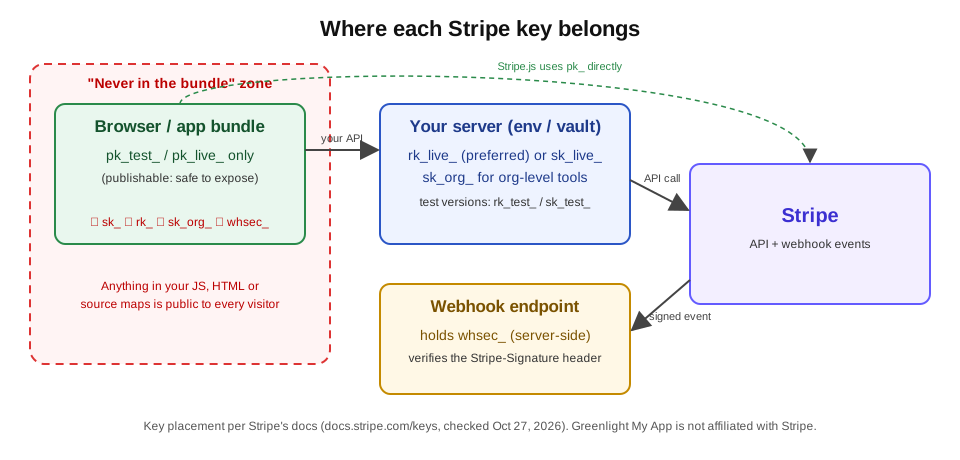 Where each Stripe key belongs. Original diagram by Greenlight My App, based on Stripe's docs (Oct 27, 2026).
How do I find my Stripe API key?
To find your Stripe API key, open the API keys page in the Stripe Dashboard. Stripe's docs say that page is where you create, reveal, expire and rotate keys for the account or sandbox you are viewing. Switch between sandbox and live mode there to see each set. A live secret key you create yourself is shown only once.
Step by step, per Stripe's docs (we didn't sign in to a Stripe account for this post):
- Go to the API keys page in the Dashboard (Stripe links it at dashboard.stripe.com/apikeys).
- Choose a sandbox to get test keys (
pk_test_,rk_test_,sk_test_), or toggle to live mode for live keys. - Copy the publishable key for your frontend. For the server, Stripe now points you to a restricted key.
- If you create a live secret or restricted key, copy it before you save it. Stripe's docs say you can't reveal it later, and Stripe can't recover a lost key. If that happens, rotate or delete it and make a new one.

That "shown once" rule is why people end up pasting a live key into a chat or a config file "just for now". Put it straight into your host's environment variables instead. Our guide to .env files (external) shows how, and the same idea applies if you are getting an OpenAI API key (external) for the same app.
What's the difference between Stripe test keys and live keys?
Stripe test keys work only in a sandbox: card networks don't process payments, and API calls return simulated objects. Live keys work in live mode, where real money moves. Test keys start with _test_ and live keys with _live_. Test keys are lower risk, but a test secret key still shouldn't ship in your frontend.
| Sandbox (test) | Live mode | |
|---|---|---|
| Prefixes | pk_test_, rk_test_, sk_test_ | pk_live_, rk_live_, sk_live_ |
| Real payments? | No. Card networks and payment providers don't process them. | Yes |
| Objects returned | Simulated (test customers, payments, refunds) | Real account data |
| Use it for | Building and testing your integration | Accepting real payments |
Source: Stripe docs, API keys ("Sandbox versus live mode"), checked Oct 27, 2026.
Why care about stripe test keys at all, if they can't move money? A test secret key still opens your sandbox data and settings, and the code path that leaked it will leak the live key the day you switch over. Our scanner treats a test secret key as a warning for that reason (see the results below). For test card numbers, use Stripe's testing docs (external).
Should you use a Stripe restricted API key instead of a secret key?
Yes, in most cases. Stripe's docs call restricted API keys (rk_) the recommended type, especially for AI agents. You choose None, Read or Write per resource, which limits the damage if the key leaks. Stripe says to treat restricted keys with the same caution as secret keys: server only, never in your app.
What Stripe's docs said on Oct 27, 2026:
- A secret key has unrestricted permissions, so Stripe doesn't recommend secret keys for new use cases and suggests migrating existing ones to restricted keys.
- Your server sends a stripe restricted api key with API requests just like a secret key, but the key can only do what you gave it permission to do.
- You can tag a restricted key as belonging to an autonomous agent. Agent-tagged keys get approval rules, so a named reviewer approves sensitive actions first.

A worked example: a small app that only creates Checkout Sessions and reads their status needs write access to Checkout Sessions and read access to what it looks up, not refunds, payouts or customer exports. If that key leaks, the damage is limited to what you allowed. With an unrestricted sk_live_ key, it isn't. (Pick the exact permissions from Stripe's docs for your own integration.)
If an AI coding tool or agent is calling Stripe for you, this matters twice. Our Claude API key security guide (external) covers how to keep any agent key out of prompts and repos.
Is the Stripe webhook secret an API key?
No. The Stripe webhook secret (whsec_) is a per-endpoint signing secret, not an API key. Your server uses it to check the Stripe-Signature header and confirm an event really came from Stripe. It can't call Stripe's API, but anyone holding it could forge events your endpoint would trust, so keep it server-side.
From Stripe's webhook docs, checked Oct 27, 2026:
- Signing secrets start with
whsec_. For a Dashboard endpoint you find it in Workbench with Reveal secret. If you use the Stripe CLI, the secret is printed in your terminal when you runstripe listen. - Verify every event with the
Stripe-Signatureheader and the endpoint secret. - Stripe recommends rolling signing secrets periodically, or when you suspect a compromise. You can expire the old secret at once or delay it for up to 24 hours.

Store whsec_ next to your other server secrets, not in frontend code. That matters below, because our scanner did not flag it.
We scanned a page with fake Stripe keys: here's what got flagged
We hid eight fake Stripe keys in a local demo page and scanned it with the Greenlight My App scanner. Live secret and restricted keys came back FAIL, their test versions WARN, and publishable keys produced no finding. The webhook secret and the organization key were not flagged, so check for those yourself.
How we ran it: one demo page with all eight fake strings in its JavaScript, then one page per key type, all served on our own machine and scanned with the scanner code that runs Greenlight My App's free scan (Oct 27, 2026, 6:52 to 6:53 AM ET). Each fake key was the prefix plus 24 X's.
| Key type (fake) | Scanner result | Finding title |
|---|---|---|
sk_live_ | FAIL | "Stripe live secret key is visible in your public code" |
rk_live_ | FAIL | "Stripe live secret key is visible in your public code" |
sk_test_ | WARN | "Stripe test secret key is visible in your public code (lower risk than a live key)" |
rk_test_ | WARN | "Stripe test secret key is visible in your public code (lower risk than a live key)" |
pk_live_ | No finding (expected) | Secrets check passed: "No secret keys found in your public code" |
pk_test_ | No finding (expected) | Secrets check passed |
whsec_ | Not flagged in this test | Secrets check passed |
sk_org_ | Not flagged in this test | Secrets check passed |


What this means for you:
- The scanner reports restricted keys under the secret-key title. If you see "Stripe live secret key is visible", search your code for both
sk_live_andrk_live_. - A publishable key in your app is fine. No finding is the right answer here.
- Don't rely on the scan for
whsec_orsk_org_. In this test it didn't flag them. Search your built files for those prefixes by hand. - The scan reads your homepage and up to 15 of the scripts it loads. Keys hidden elsewhere, such as in source maps (external) or pages it didn't load, may not show up. "No finding" isn't a guarantee.
Taking payments in an app built with Lovable, Bolt, Cursor or v0? Run Greenlight My App's free scan (external) before launch. It looks for secret keys that shouldn't be there, including Stripe secret and restricted keys, in your homepage and up to 15 of the scripts it loads.
Leaked a Stripe secret key? Do this now
If a Stripe secret or restricted key leaks, rotate it in the Dashboard right away. Stripe's docs say to treat any exposure as a potential compromise, even if you aren't sure anyone saw it. Then move the new key into server environment variables, remove the old one from your code and history, and check the key's request logs.
- Rotate the key. On the API keys page, open the key's menu and choose Rotate key, and pick an expiration for the old key. Stripe's docs say the old and new keys can both work for up to 7 days. For a leak, choose Now if you can deploy the new key right away (your app's Stripe calls fail until you do), or the shortest expiration that gives you time to deploy.
- Put the new key in your server environment. Not in frontend code, and not in a file that gets committed. See what a .env file is (external).
- Find every copy of the old key. Check your built JavaScript, your source maps (external), your repo history and any shared chats or tickets.
- Check the key's request logs in the Dashboard for calls you don't recognize.
- Add an access policy. Stripe recommends access policies on all live keys, so a key only works from servers you know about.
- Switch to a restricted key if the leaked one was an unrestricted
sk_live_key.

A worked example of the timing: you rotate a leaked sk_live_ key at 9:00 AM. If you picked a 7-day expiration, your server's old key keeps working, but an attacker could use the old key for up to 7 days too. For a real leak, keep that window as short as you can: deploy the new key, check the old key's request logs, then use Expire key on the old one.
Exposed a different kind of service key? The same steps apply, and our guide to an exposed Supabase service role key (external) walks through that case. For a full pre-launch pass, use the Lovable launch checklist (external).
FAQ
How do I find my Stripe API key? Open the API keys page in the Stripe Dashboard. Stripe's docs say you create, reveal, expire and rotate keys there for the account or sandbox you are viewing. Use a sandbox for test keys and toggle to live mode for live keys. A live secret key you create is shown once, so copy it before saving.
What is the Stripe API? The Stripe API is the set of web endpoints your app calls to work with payments and related objects, such as customers, payments, refunds and subscriptions. Your app proves which account is calling by sending an API key. Publishable keys handle browser-side steps; secret or restricted keys handle everything sensitive on your server.
Is the Stripe publishable key safe to share?
Yes. Stripe's docs mark publishable keys (pk_test_, pk_live_) as safe to expose and say you can include them in frontend code. A publishable key can create tokens or payment methods but can't create charges or read account data. In our test, a page with only a publishable key produced no finding.
What's the difference between Stripe test and live keys?
Test keys (_test_) work in a sandbox, where card networks don't process payments and the API returns simulated objects. Live keys (_live_) work in live mode, where real payments happen. Keep both secret if they are secret or restricted keys; only the publishable versions belong in your app.
What is a Stripe restricted key?
A restricted key (rk_test_ or rk_live_) is a server-side key with only the permissions you choose: None, Read or Write per resource. Stripe recommends restricted keys over unrestricted secret keys, especially for AI agents. Stripe says to protect them like secret keys, so never put one in frontend code.
What should I do if my Stripe secret key is leaked? Rotate it in the Dashboard right away; Stripe says to treat any exposure as a potential compromise. Deploy the new key to your server environment, then expire the old one (choose Now when rotating, or use Expire key once you've deployed). Remove every copy from code, history and source maps, check the key's request logs, and add an access policy.
Check your app before you take payments
Taking payments in an app built with Lovable, Bolt, Cursor or v0? Run Greenlight My App's free scan before launch. It looks for secret keys that shouldn't be there, including Stripe secret and restricted keys, in your homepage and up to 15 of the scripts it loads. It's automated, read-only and educational, not a security audit, and "nothing found" isn't a guarantee that nothing is exposed.
Sources
On this site
Related posts

What Is an API Key? Public vs Secret Keys, Explained
What is an API key? A plain-English guide to public vs secret keys, what happens if one leaks, and how to check your app's code before launch.
How to Get an OpenAI API Key (and Keep It Safe)
How to get an OpenAI API key in 4 steps, then keep it out of your frontend, set a spend limit, and revoke it fast if it leaks.
What Is a .env File? Format, Examples and Safety
A .env file stores app settings and secret keys as NAME=value lines. See the format, how to create one, and the two ways it ends up public.


Get the next change before it bites
Greenlight tips and new blog posts: short, practical notes when Supabase, Lovable, Bolt, Cursor or another tool you build with changes something that affects your app, plus what to check. About twice a month.
We'll send a confirmation email first. Unsubscribe anytime. Privacy. Greenlight My App is independent and not affiliated with or endorsed by Supabase, Lovable, Bolt, Cursor or any other tool we mention.
Greenlight My App is independent and not affiliated with or endorsed by Stripe, Lovable, StackBlitz (Bolt), Anysphere (Cursor) or Vercel (v0). Stripe is a trademark of its owner. All product names are trademarks of their owners. Stripe facts are paraphrased from Stripe's public docs as checked on Oct 27, 2026, and can change. This page is general information, not professional security advice, legal advice, a security audit or a guarantee. Check your own setup against the vendor's current docs.