Supabase service role key exposed? How to rotate it, step by step
Supabase service role key exposed? Here's the order Supabase's docs give: close the leak, create a new key, swap it in, then retire the old one.
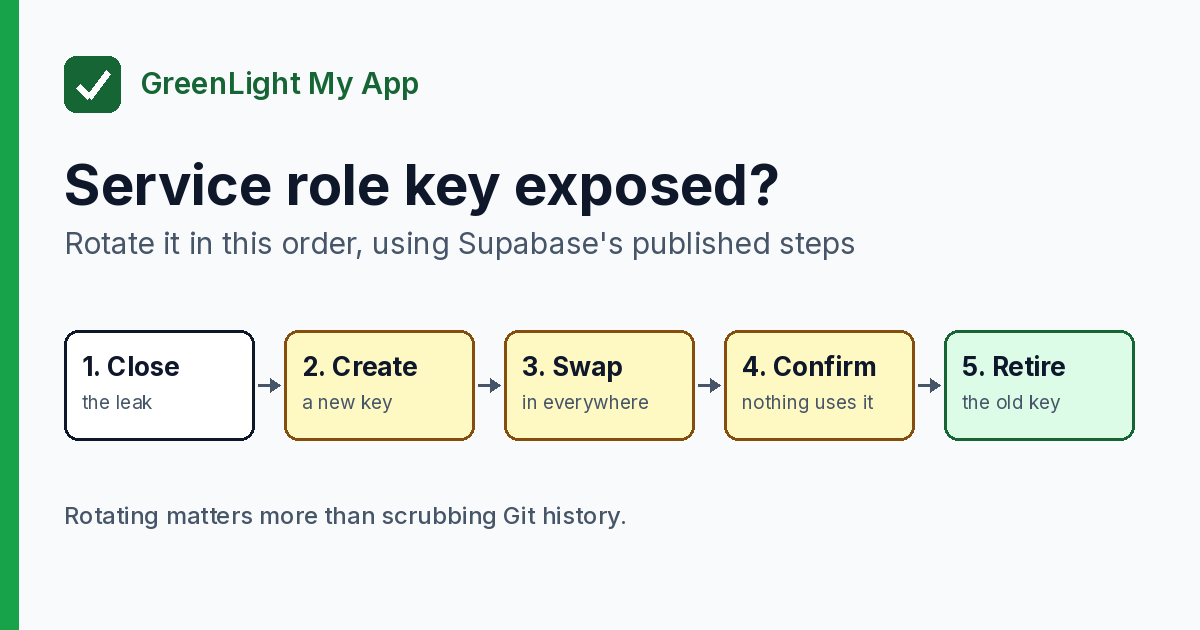
Short answer: Rotate it, in order. The service_role key (and the newer secret key, sb_secret_...) bypasses Row Level Security. Supabase's steps are: fix how it leaked, create a new secret key, replace the old key everywhere, confirm, then retire the old key. Rotating matters more than scrubbing Git history.
By Gary, Greenlight · Last checked against Supabase docs: Oct 18, 2026 · Drafted with AI tools and reviewed before publishing.
Want an outside look at what your live site exposes? Run a free Greenlight check. It covers the basics (HTTPS, security headers, exposed keys) and is not a full security audit.
Already read is the Supabase anon key safe? This post is the next step, for when the key you found is the secret one.
First: is it really the secret key?
- Publishable (
sb_publishable_...) or legacyanon: meant to be public. Finding it in your frontend isn't a leak. See is the anon key safe? - Secret (
sb_secret_...) or legacyservice_role: must never leave your server. Legacy keys are long strings starting witheyJ, so don't guess. Compare what you found with Settings → API Keys in your Supabase dashboard.
Don't test a leaked key by calling the API with it. Compare it with what your dashboard shows.
Rotate it in this order
1. Find and close the leak. Supabase's docs say: "Don't rush. Fix the root cause of the leak before you rotate anything."
Not rushing doesn't mean waiting. Until you retire it in step 5, the leaked key still works, so go through these steps as soon as you can.
Common places a secret key ends up:
- Frontend code, or a variable your framework sends to the browser. Names starting with
NEXT_PUBLIC_orVITE_get bundled into browser code. - A committed file such as
.env - Chat messages, screenshots, logs or a URL
Move the key to server-only storage, such as Edge Function secrets or your host's environment settings with no public prefix. If a frontend feature needed the key to work, that feature has to move to a server function. That's the real fix.
Before → after (placeholder values only):
# Before: shipped to the browser
NEXT_PUBLIC_SUPABASE_SERVICE_KEY=eyJ...REDACTED

# After: server-only, no public prefix
SUPABASE_SECRET_KEY=sb_secret_...REDACTED
2. Create a new secret key. In Settings → API Keys, create a new secret key. Supabase notes that creating new keys doesn't revoke your legacy keys, so nothing breaks yet.
3. Replace the old key everywhere. Put the new secret key into every server, Edge Function, cron job, webhook and CI setting that used the old one. Supabase suggests a separate secret key for each backend component, so a future leak forces only one swap. In Edge Functions, Supabase now recommends its @supabase/server SDK, or reading the new key from SUPABASE_SECRET_KEYS. The old SUPABASE_SERVICE_ROLE_KEY variable still carries the legacy key. Changing a stored key doesn't update code that's already running. On many hosts, a changed environment variable only applies to new deployments (Vercel says this in its docs), so redeploy each app after you swap the key. Database Webhooks and pg_net calls that sent the old service_role key on an Authorization: Bearer header need the new secret key on the apikey header instead, because the new keys aren't JWTs. Supabase's migration guide covers this, and Edge Functions called with a secret key also need verify_jwt = false.
4. Confirm nothing uses the old key. Supabase's migration guide calls this a manual check. Go through every place that holds a Supabase key. If you're retiring the legacy keys, that includes moving your frontend from the legacy anon key to the publishable key first.
5. Retire the old key. Do this as soon as step 4 is done. Supabase's security reference says to delete a leaked key immediately, because the key still works outside a browser.
- New-style secret key: delete it. This can't be undone, so finish step 4 first.
- Legacy
service_rolekey: deactivate the legacy keys in Settings → API Keys. Supabase treats this as one step for the legacy keys, so do it only after every client has moved off the legacyanonkey too, including mobile or desktop app versions already in users' hands. It's reversible, so you can turn them back on if something you missed stops working.
6. Look for unexpected activity. Review your project's logs in the dashboard for requests you don't recognize, and check your data for changes you didn't make. If the app holds other people's personal data, get proper advice on whether you need to tell anyone.
7. Then decide about Git history. GitHub's docs say that once a secret is revoked or rotated it can no longer be used, and that "may be sufficient." Rewriting history has side effects, and copies can survive in clones and forks. If you do rewrite it, follow GitHub's guide. Either way, add .env to .gitignore and turn on push protection.
Things that don't fix it
- "I deleted the commit." The key may still be in clones, forks or caches. Rotate it.
- "Secret keys don't work in browsers, so I'm fine." Supabase returns 401 for new secret keys used from a browser, but notes that an attacker can still use a leaked key from other tools.
- "I'll add better RLS policies." Secret keys skip RLS entirely.
- "I'll rotate the anon key." That's the public key. It's the secret one that needs replacing.
FAQ
What can someone do with my service_role key?
Per Supabase's docs, secret and service_role keys give full access to your project's data and bypass Row Level Security.
Will rotating break my app? It shouldn't if you follow the order: create the new key, swap it in everywhere and redeploy, confirm, then retire the old one. Anything still using the old key will fail once you retire it. Deactivating legacy keys can be undone; deleting a new-style secret key can't.
Do I need to rewrite my Git history? Rotate first. GitHub says rotation may be enough, and history rewrites have side effects.
Where do I find my service role key?
In your Supabase dashboard under Settings → API Keys. Supabase recommends moving to the newer secret keys, because it is deprecating anon and service_role by the end of 2026.
Does Greenlight check for this? Greenlight's free scan checks the basics from the outside (HTTPS, security headers, exposed keys). It doesn't log into your Supabase project.
Paid reports: coming soon.
Sources
- Supabase docs, API keys (rotate a leaked key; handling secret keys; Edge Functions) (external)
- Supabase docs, Migrating to new API keys (external)
- Supabase docs, JWT signing keys (external)
- Supabase docs, Logs (external)
- GitHub docs, Removing sensitive data from a repository (external)
- GitHub docs, Push protection (external)
- Vite docs, Env variables and modes (external)
- Vercel docs, Environment variables (external)
On this site
Greenlight is independent and not affiliated with or endorsed by Supabase or GitHub. Product names are used only to describe compatibility. This page is general information, not professional security advice, legal advice, a security audit or a guarantee. Check your own setup against the vendor's current docs.