What Is HSTS? We Tested the Header Before and After
HSTS (HTTP Strict Transport Security) is a response header that tells browsers to load your site only over HTTPS for a set time, so they upgrade plain http:// links on their own.

On this page
- What is HSTS?
- How HSTS works with your HTTP-to-HTTPS redirect
- The Strict-Transport-Security header, line by line
- includeSubDomains and preload: powerful but hard to undo
- How to turn on HSTS for an app built with Lovable, Bolt, Cursor or v0
- Fixing "HSTS missing from HTTPS server"
- How to check HSTS on your site
- We tested it: our scanner before and after adding HSTS
- FAQ
- Run a free scan before you launch
What is HSTS? HSTS (HTTP Strict Transport Security) is a response header that tells browsers to load your site only over HTTPS for a set time. After a browser sees it, it upgrades plain http:// links to https:// on its own. Below: the HSTS meaning in plain English, the header line by line, how to fix "HSTS missing", and what our scanner showed before and after we added it.
By Gary, Greenlight My App · Updated Oct 27, 2026 · How we checked this: on Oct 27, 2026 (6:53 to 6:58 AM ET) we served one demo page on our own machine three ways (no HSTS, a 5-minute HSTS, and a 2-year HSTS with includeSubDomains) and scanned each with the Greenlight My App scanner. We also read our own site's headers with curl and its status on hstspreload.org (nothing submitted). MDN, OWASP, hstspreload.org and Vercel docs were read the same morning. Drafted with AI tools and reviewed by a person before publishing.
What is HSTS?
HSTS is a web security policy sent in the Strict-Transport-Security response header. It tells browsers your site should only be loaded over HTTPS. For as long as the max-age value lasts, the browser upgrades any http:// request to https:// itself, and MDN says users can't click through certificate errors on that site.
Here is what that changes in practice, per MDN's Strict-Transport-Security reference (external):
- Someone types
yoursite.comor clicks an oldhttp://link. Without HSTS, the browser first makes a plain-HTTP request and waits for your redirect. With HSTS, it skips that request and goes straight to HTTPS. - If your certificate has a problem, the browser shows an error the user can't bypass. That protects people on hostile networks, such as shared Wi-Fi.

So what does it mean if a website uses HSTS? It means the site has told your browser, "use HTTPS with me, every time, until this rule expires."
How HSTS works with your HTTP-to-HTTPS redirect
HSTS doesn't replace your redirect. The first time a browser visits, it may still ask for http://, and your server should redirect HTTP to HTTPS with a permanent redirect. Once the browser gets the HSTS header over HTTPS, it forces HTTPS on its own for later visits. Preloading can help close that first-visit gap, with caveats: it's very hard to undo, and hstspreload.org itself doesn't recommend it.
MDN and OWASP both describe the same weak spot: the very first request. Until a browser has seen your header, an attacker on the network could interfere with that plain-HTTP request. That's why the redirect still matters, and why the preload list exists.
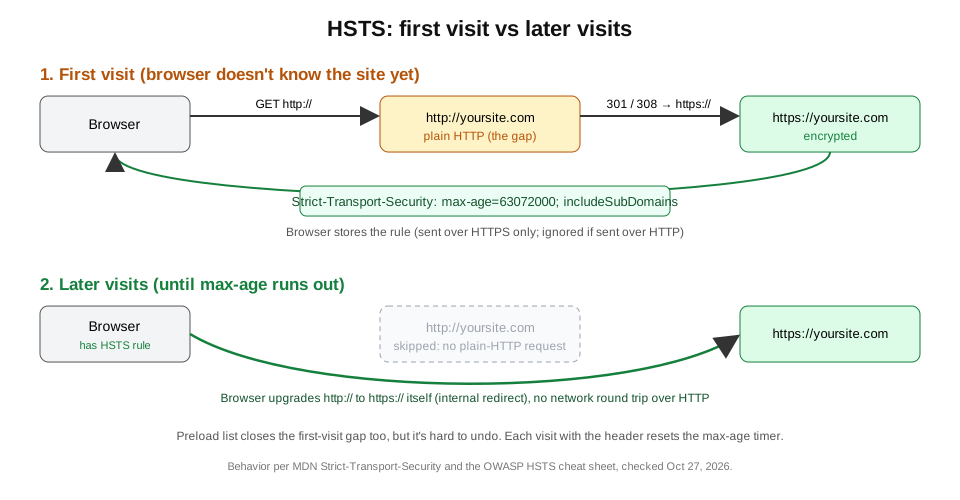 First visit vs later visits. Original diagram by Greenlight My App, based on MDN and OWASP (Oct 27, 2026).
Two rules from MDN to keep in mind:
- Send the header over HTTPS only. Browsers ignore it over HTTP, because an attacker could add or remove it there.
- Your plain-HTTP response should be the redirect to HTTPS. You don't need the header on it.
The Strict-Transport-Security header, line by line
The HSTS header is one line: Strict-Transport-Security: max-age=<seconds>, plus two optional directives, includeSubDomains and preload. max-age is how long browsers remember the rule. Each time a browser sees the header again, the timer starts over. Setting max-age=0 tells browsers to forget the rule.
| Directive | What it does | Example | Watch out |
|---|---|---|---|
max-age | Seconds the browser remembers "HTTPS only" | max-age=31536000 (1 year) | Required. Long values are hard to walk back. |
includeSubDomains | Applies the rule to every subdomain too | max-age=63072000; includeSubDomains | Every subdomain must work over HTTPS. |
preload | Says you consent to the browser preload list | ...; includeSubDomains; preload | Not part of the standard; you still have to submit. |
Source: MDN Strict-Transport-Security and the OWASP HSTS Cheat Sheet, checked Oct 27, 2026.
Worked example of max-age math:
| Value | Seconds | About |
|---|---|---|
max-age=300 | 300 | 5 minutes |
max-age=86400 | 86,400 | 1 day |
max-age=31536000 | 31,536,000 | 1 year (365 days) |
max-age=63072000 | 63,072,000 | 2 years (730 days) |
Our own site sends strict-transport-security: max-age=63072000; includeSubDomains (two years, covering subdomains, with no preload), per curl:

includeSubDomains and preload: powerful but hard to undo
includeSubDomains makes every subdomain HTTPS-only, and preload asks browsers to build that rule in before anyone visits. Both are strong protections, but both can lock out an old subdomain that only works over HTTP. hstspreload.org calls removal from the preload list slow and painful, so ramp up first.
The OWASP HSTS Cheat Sheet (external) labels the preload step as having "PERMANENT CONSEQUENCES" for your domain. It also notes a real gap when you leave out includeSubDomains: cookie attacks through a subdomain that still allows plain HTTP.
hstspreload.org (external) lists these requirements for HSTS preloading, as of Oct 27, 2026:
- A valid certificate.
- Redirect HTTP to HTTPS on the same host, if you listen on port 80.
- Serve every subdomain over HTTPS, including
wwwif it exists. Preloading applies to all subdomains, including internal subdomains that aren't public. - Send a header on the base domain with
max-ageof at least 31536000 (1 year),includeSubDomainsandpreload.
hstspreload.org is also blunt about whether to do it at all: "While HSTS is recommended, HSTS preloading is not recommended." It says the extra benefit over plain HSTS is minimal, because browsers already upgrade most navigations to HTTPS (checked Oct 27, 2026).
Its suggested ramp-up has three stages, waiting the full max-age at each step and checking for problems:
| Stage | Header |
|---|---|
| 1 | max-age=300; includeSubDomains (5 minutes) |
| 2 | max-age=604800; includeSubDomains (1 week) |
| 3 | max-age=2592000; includeSubDomains (1 month) |

We haven't preloaded greenlightmyapp.com. Its status on hstspreload.org shows it isn't on the list, with the error "No preload directive", because our header doesn't include preload. We didn't submit anything.

How to turn on HSTS for an app built with Lovable, Bolt, Cursor or v0
How you turn on HSTS depends on your host, not on the tool that wrote the code. On Vercel, where v0 apps deploy, the docs say HTTP is redirected to HTTPS with a 308 and custom domains get a default HSTS header. For Lovable, Bolt or any other host, check your host's docs for custom response headers.
What Vercel's encryption docs (external) said on Oct 27, 2026:
- HTTP requests are forwarded to HTTPS with a 308 status, and that can't be turned off.
*.vercel.appdomains getmax-age=63072000; includeSubDomains; preload.- Custom domains get
max-age=63072000;by default, covering only that host. You can change it with custom response headers.
If you're using Cursor or another editor with a Next.js app, you can set the header yourself. This is the line from our own next.config.mjs:
async headers() {
  return [{
    source: "/(.*)",
    headers: [
      { key: "Strict-Transport-Security", value: "max-age=63072000; includeSubDomains" },
    ],
  }];
}
For Lovable and Bolt apps, we aren't quoting host behavior here, because it depends on where you publish. Look up "custom response headers" in your host's docs, then confirm the result with the checks below. Our Lovable launch checklist (external) and Bolt launch checklist (external) cover the rest of the pre-launch pass.
Fixing "HSTS missing from HTTPS server"
"HSTS missing from HTTPS server" means a scanner loaded your site over HTTPS and found no Strict-Transport-Security header. To fix it, add the header in your host or framework config, served over HTTPS. Start with a short max-age, confirm everything still loads, then raise it to a year or more.
A safe order of steps, based on OWASP and hstspreload.org advice:
- Make sure every page and asset loads over HTTPS, that HTTP redirects to HTTPS, and that every subdomain works over HTTPS, including internal ones that aren't public.
- Add
Strict-Transport-Security: max-age=300; includeSubDomainsand deploy. If you can't vouch for every subdomain, leaveincludeSubDomainsout for now. - Check it's there (next section). Browse the site and its subdomains.
- Raise
max-ageto a week, then a month, then a year or two, keepingincludeSubDomains. If you skippedincludeSubDomainsat step 2, add it later by dropping back tomax-age=300; includeSubDomainsand ramping up again. - Only consider
preloadafter that, and read the next FAQ first.
Set it on your site's whole response, not one page. While you're in your headers config, the same place is where X-Frame-Options (external) lives.
How to check HSTS on your site
To check HSTS, run curl -I https://yoursite.com and look for a strict-transport-security line. You can also open your browser's devtools, reload, and read the response headers, or use a free HSTS checker such as Greenlight My App's security headers checker. Chrome also shows what it stored at chrome://net-internals/#hsts.
Four ways to run an HSTS test:
| Method | What you see | Good for |
|---|---|---|
curl -I https://yoursite.com | The raw header line, if present | Quick terminal check |
| Browser devtools, Network tab | Response headers for the page | No install needed |
chrome://net-internals/#hsts | Rules your copy of Chrome has stored for a domain | Seeing the browser side |
| Security headers checker (external) | HSTS and other security headers, with a plain-English result | Non-technical check |
Testing your own site and need to clear HSTS in Chrome? The chrome://net-internals/#hsts page has a "Delete domain security policies" box. It removes rules your browser learned from headers, not entries that are built in through the preload list.

We tested it: our scanner before and after adding HSTS
We served one demo page three ways and scanned each with the Greenlight My App scanner. With no header, it warned "HSTS is missing". With a 5-minute header, it passed "HSTS is set" and noted subdomains weren't covered. With two years and includeSubDomains, both checks passed.
| Variant | Header sent | HSTS result | Subdomains result |
|---|---|---|---|
| A | (none) | WARN "HSTS is missing" | (not shown) |
| B | max-age=300 | PASS "HSTS is set" | INFO "HSTS doesn't cover subdomains" |
| C | max-age=63072000; includeSubDomains | PASS "HSTS is set" | PASS "HSTS covers your subdomains" |

What we learned, and the limits of this test:
- The scanner checks that HSTS is present and whether it covers subdomains. It doesn't tell you the right
max-age; pick that from the advice above. - The demo ran on our own machine at an IP address. MDN notes browsers don't store HSTS for an IP address, so this shows what the scanner reads, not browser behavior.
- We couldn't test the HTTP-to-HTTPS redirect in this setup, so this test makes no claim about it.
FAQ
What does it mean if a website uses HSTS? It means the site sends a Strict-Transport-Security header telling your browser to use HTTPS only. For the time set in max-age, your browser upgrades any http:// link to https:// on its own and won't let you click past certificate errors for that site. It protects you on networks you don't trust.
Is HSTS the same as HTTPS? No. HTTPS is the encrypted connection itself. HSTS is a rule, sent over HTTPS, that tells browsers to always use that encrypted connection for your site. You need HTTPS working first; HSTS then stops browsers from falling back to plain HTTP on later visits, until the max-age runs out.
How do I clear HSTS in Chrome for my own site? Open chrome://net-internals/#hsts, type your domain in "Delete domain security policies" and click Delete. That clears rules Chrome learned from your header. It can't remove a domain that's on the built-in preload list. Your site will set the rule again the next time it sends the header.
What max-age should HSTS use? Start short, such as 300 seconds (5 minutes) or one day, while you confirm everything loads over HTTPS. Then step up to a week and a month. MDN and OWASP show one to two years for production, and the preload list requires at least 31536000 seconds (one year).
Should I submit my site to the HSTS preload list? Only if every subdomain will stay on HTTPS for good. Preloading builds the rule into browsers, which can help close the first-visit gap, with caveats. hstspreload.org itself says "HSTS preloading is not recommended" and that removal is slow and painful, and OWASP warns of permanent consequences. Ramp up max-age with includeSubDomains first, then decide.
Does HSTS make my site secure? No single header does. HSTS keeps browsers on HTTPS, which protects connections from downgrade attacks. It doesn't fix bugs in your app, exposed keys, weak database rules or other headers. Treat it as one item on your launch checklist, then check the rest with a broader scan.
Run a free scan before you launch
Not sure your app sends HSTS? Check it free with Greenlight My App's security headers checker, or run the full free scan before you launch. The scan is automated, read-only and educational, not a security audit, and "nothing found" isn't a guarantee that nothing is wrong.
Sources
On this site
Related posts
X-Frame-Options: Stop Clickjacking With One Header
X-Frame-Options tells browsers whether other sites may show your app in a frame. DENY vs SAMEORIGIN, CSP frame-ancestors, and host setup.

Get the next change before it bites
Greenlight tips and new blog posts: short, practical notes when Supabase, Lovable, Bolt, Cursor or another tool you build with changes something that affects your app, plus what to check. About twice a month.
We'll send a confirmation email first. Unsubscribe anytime. Privacy. Greenlight My App is independent and not affiliated with or endorsed by Supabase, Lovable, Bolt, Cursor or any other tool we mention.
Greenlight My App is independent and not affiliated with or endorsed by Lovable, StackBlitz (Bolt), Anysphere (Cursor), Vercel (v0), Google, Mozilla or OWASP. All product names are trademarks of their owners. Host behavior is quoted from each host's public docs as checked on Oct 27, 2026, and can change. This page is general information, not professional security advice, legal advice, a security audit or a guarantee. Check your own setup against the vendor's current docs.