What Is an API Key? Public vs Secret Keys, Explained
An API key is a long string your app sends with each request so a service knows which account is calling, can allow or limit the request, and can bill the right account.

On this page
- What is an API key?
- What is an API key used for?
- How does an API key work in an app built with Lovable, Bolt or Cursor?
- Which API keys are safe to make public, and which must stay secret?
- What happens if someone gets your secret API key?
- How do secret keys end up in your frontend code?
- What happened when we tested the VITE_ prefix?
- How do you check if your app exposes an API key?
- What should you do if your API key leaked?
- FAQ
- Check your app before launch
What is an API key? An API key is a long string your app sends with each request to a service, such as a payment, AI or maps API, so the service knows which account is calling. The service uses it to allow the request, limit how much you can use, and bill the right account. Some API keys are meant to be public. Most are secret, and those must never end up in the code your visitors download.
By Gary, Greenlight My App · Updated Oct 23, 2026 · How we checked this: every provider fact links to that provider's own docs, read on Oct 23, 2026. The bundle test and the before/after scan ran on Oct 23, 2026 on our own tiny Vite demo app, with obviously fake keys only (details in the test section below). Drafted with AI tools and reviewed by a person before publishing.
What is an API key?
An API key is a unique code that an app includes with its requests to an API so the service can identify the calling project or account. The service checks the key, decides whether the request is allowed, applies that account's limits, and records the usage for billing.
Think of it as an account ID and a password rolled into one string. That's the whole API key meaning in one line: it identifies the caller. Stripe's docs put it simply: "Stripe uses API keys to authenticate requests from your integration and determine which Stripe resources it can access" (Stripe docs (external)).
Most keys look like random text. Many providers add a short prefix so you can tell key types apart at a glance. Stripe, for example, starts publishable keys with pk_ and secret keys with sk_.
What is an API key used for?
An API key is used to identify the app making a request, control what it's allowed to do, cap how much it can use, and bill the right account. Without a key, a paid API couldn't tell your app's requests from anyone else's, so it couldn't charge you, limit you, or block abuse.
Here's what that looks like with services AI-built apps commonly use:
| Service | What the key does | Public or secret? |
|---|---|---|
| Stripe | Lets your app create payments and read your Stripe data | Publishable key public; secret and restricted keys secret (Stripe (external)) |
| OpenAI or Claude | Lets your app call the model and bills your account per use | Secret (Claude help center (external)) |
| Supabase | Lets your app reach your database through Supabase's API | Publishable/anon key public; secret/service_role key secret (Supabase (external)) |
| Google Maps (JavaScript) | Loads maps in the browser and bills your Google Cloud project | Used in the browser, but must be restricted (Google (external)) |
Anthropic's help center puts the money side plainly: "Much like a credit card number, if someone obtains and uses your API key, they incur charges on your behalf."
How does an API key work in an app built with Lovable, Bolt or Cursor?
Your app sends the key with each request, usually in a header, and the service checks it before doing anything. Where the key lives decides who else can use it. A key in browser code can be read by every visitor. A key on your server can't.
A typical request looks like this:
- A visitor clicks a button in your app.
- Your code sends a request to the provider's API, with the key attached (for example
Authorization: Bearer <key>). - The provider checks the key, runs the request, and records the usage against your account.
The risk comes from step 2. AI app builders write a lot of frontend code quickly, and the fastest way to make a paid API call "just work" is to put the key right in that frontend code. It works in the preview, so nothing looks wrong. But everything in your frontend is shipped to every visitor's browser.
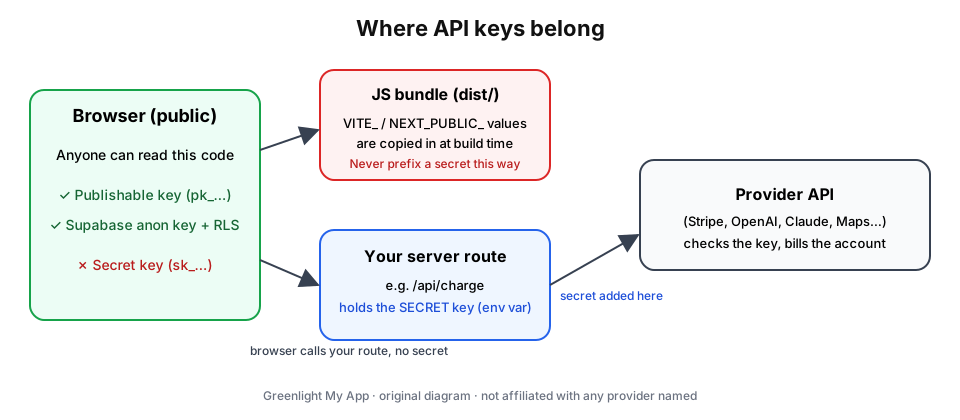 Where API keys belong: publishable keys can sit in the browser; secret keys stay in a server route that calls the provider for you. Original diagram by Greenlight My App.

Which API keys are safe to make public, and which must stay secret?
Publishable keys are designed to be public; secret keys are not. A publishable key (Stripe's pk_, Supabase's publishable or anon key) can only do limited, safe-to-share things. A secret key can act as your account. Stripe's rule is clear: "Only publishable keys are safe to expose outside your application's backend."
| Key type | Example prefix (from the provider's docs) | Safe in browser? | What to do |
|---|---|---|---|
| Stripe publishable key | pk_test_, pk_live_ | Yes. Stripe says "It's safe to embed this key in your code or apps." | Use it in client code |
| Stripe secret key | sk_test_, sk_live_ | No | Server only, in an environment variable or secrets vault |
| Stripe restricted key | rk_test_ | No. Stripe says you're responsible for protecting restricted keys too | Server only, with only the permissions it needs |
| Supabase publishable or anon key | sb_publishable_ (anon: a long JWT) | Yes, by design | Fine in the browser, but only safe if Row Level Security protects your tables |
| Supabase secret or service_role key | sb_secret_ (service_role: a long JWT) | No. It bypasses Row Level Security | Server, Edge Functions or cron jobs only |
| OpenAI or Claude API key | See your provider's dashboard | No | Server route only; set a spend limit |
| Google Maps JavaScript API key | See Google Cloud console | Used in the browser by design | Add website and API restrictions; Google says you're "financially responsible for charges caused by abuse of unrestricted API keys" |

For Supabase specifically, read is my Supabase anon key safe? for the public key and Supabase service role key exposed for what to do if the secret one ends up in your frontend.
What happens if someone gets your secret API key?
Anyone with your secret key can make requests as you. Depending on the service, that can mean usage billed to your account, access to your data, changes to your settings, or your account hitting its limits so your real app stops working. The longer the key stays valid, the more they can do.
What the damage looks like depends on the key:
- AI model keys (OpenAI, Claude): someone else's usage on your bill. That's why both providers recommend keeping keys on a server and setting spend limits.
- Payment secret keys (Stripe): access to your Stripe account through the API, within whatever that key is allowed to do. Stripe recommends restricted keys for server code "to limit the damage to your business if your keys are ever exposed or compromised."
- Database secret keys (Supabase service_role or secret): they bypass Row Level Security, so they can read and change every row.
This week's news is a reminder of why speed matters. On Oct 21, 2026, the hosting platform Railway disclosed that an unauthorized third party may have accessed some customers' environment variables, which can contain secrets such as API keys. Railway recommended that all users roll their environment variables, including API keys, as a precaution (Railway's disclosure (external)). Secrets can be exposed in ways you don't control, so knowing how to rotate a key quickly is part of using one.
A publishable key leaking isn't the same thing. It's public by design. What matters there is that the rules behind it (Supabase's Row Level Security, Google's key restrictions) are set.
How do secret keys end up in your frontend code?
A common way is an environment variable with a public prefix. Vite copies every variable that starts with VITE_ into the JavaScript it builds, and Next.js does the same for NEXT_PUBLIC_. Name a secret that way and it ships to every visitor, even though it lives in your .env file.
Vite's docs say so directly: "Variables prefixed with VITE_ will be exposed in client-side source code after Vite bundling," and "VITE_* variables should not contain sensitive information such as API keys" (Vite docs (external)). Next.js: "Non-NEXT_PUBLIC_ environment variables are only available in the Node.js environment, meaning they aren't accessible to the browser" (Next.js docs (external)).
What happened when we tested the VITE_ prefix?
We built a tiny Vite app (Node 20.19.2, Vite 8.3.5) with three obviously fake values in its .env file, ran npm run build, and searched the built dist/ folder for each one:
| Variable in .env | Fake value (shortened) | Read by browser code? | Found in the built bundle? |
|---|---|---|---|
VITE_PUBLIC_KEY | pk_test_FAKEDEMO… | Yes | Yes (expected: publishable keys are meant to be public) |
VITE_SECRET_KEY | sk_live_FAKEDEMO… | Yes (the mistake) | Yes, in plain text inside an Authorization: Bearer header |
SECRET_KEY (no prefix) | sk_live_FAKEDEMO… | No | No |

dist/ folder: the VITE_-prefixed secret is in the bundle, the unprefixed one isn't.

The lesson: the .env file itself wasn't the leak. The prefix was. For more on how .env files work, read what is a .env file?. We didn't test NEXT_PUBLIC_ or source maps in this demo; source maps can also publish your original code, which we cover in source maps in production.
How do you check if your app exposes an API key?
Search the JavaScript your site actually serves for key prefixes, or run an automated scan of your public code. In your browser, open DevTools, go to the Sources (or Debugger) panel, and search all files for prefixes like sk_, sk-, sb_secret_ or service_role. Anything secret that turns up there is public.
A quick manual check:
- Open your live site and press F12 (or right-click → Inspect).
- Open Sources and use "Search all files" (Ctrl+Shift+F, or Cmd+Option+F on a Mac).
- Search for each secret prefix your providers use. Publishable keys showing up is normal.
- If you find a secret, treat it as leaked even if you remove it now (see the next section).
We also ran Greenlight My App's scanner code on our demo, before and after the fix. Before: FAIL, "Stripe live secret key is visible in your public code." The pk_test_ publishable key was not flagged, which is correct.


/api/charge: PASS, "No secret keys found in your public code."
A caveat, in the open: the live scan form only scans public websites, so we ran the same scanner code against our demo on our own machine (localhost). The scan looks for common secret key patterns in your public code. It doesn't log in, read your server or test your app's logic, and "nothing found" isn't a guarantee that nothing is exposed.
What should you do if your API key leaked?
Rotate it: create a new key, put it on your server, revoke the old one, then check what the old key was used for. Removing the key from your code isn't enough. Copies of your old JavaScript can stay in caches, archives and anyone's downloads, so the old key has to stop working.
Step by step:
- Create a new key in the provider's dashboard. Stripe can also rotate a key for you: "Rotating an API key revokes it and generates a replacement key that's ready to use immediately" (Stripe docs (external)).
- Store the new key on the server only, in an environment variable without a public prefix.
- Move the API call behind a server route. In our fix, the browser calls
/api/chargeon our own server, and only the server readsSECRET_KEY. - Revoke the old key if rotating didn't already do it.
- Check usage and set limits. Look for requests you don't recognize, and set a spend limit or budget where the provider offers one (OpenAI (external)).
- Rebuild and re-check the served JavaScript, as in the section above.


sk_live_ anywhere.
Provider-specific guides: Claude API key security and how to get an OpenAI API key (and keep it safe).
FAQ
What is an API key in simple terms? An API key is a long code your app sends to a service with each request, so the service knows which account is calling. It works like an account ID and password in one string. The service uses it to allow the request, apply your limits and bill your account.
What is an API key used for? It's used to identify the app or account making a request, decide what that caller may do, cap usage and bill the right account. Payment, AI, database and maps services all use keys, and many offer separate public and secret keys for browser code and server code.
Is it safe to put an API key in my frontend code? Only if it's a publishable or public key meant for browsers, such as a Stripe publishable key or a Supabase anon key with Row Level Security on. Secret keys must stay on a server. In our Vite test, a secret named with the VITE_ prefix showed up in plain text in the public bundle.
What happens if someone gets my API key? With a secret key, they can make requests as you. That can mean charges on your bill, access to your data, or your account hitting its limits. Rotate the key quickly: create a new one, update your server, revoke the old one, and check your usage for anything you don't recognize.
How do I know if my API key leaked? Search the JavaScript your live site serves for your providers' secret key prefixes, using your browser's DevTools, or run an automated scan of your public code. Also watch your provider's usage page for unexpected requests. If a secret ever appeared in public code, treat it as leaked and rotate it.
What's the difference between a public and a secret API key? A public (publishable) key is designed to sit in browser or app code and can only do limited things, such as starting a checkout. A secret key can act as your account, so it belongs on a server. Stripe says only publishable keys are safe to expose outside your backend.
Check your app before launch
Built your app with Lovable, Bolt, Cursor or v0? Scan your app before launch with Greenlight My App's free scan. It checks your public code for secret keys that shouldn't be there. It's automated, read-only and educational, not a security audit, and "nothing found" isn't a guarantee that nothing is exposed. Run a free scan (external).
Sources
- Stripe docs: API keys (external)
- Supabase docs: API keys (external)
- Vite docs: Env variables and modes (external)
- Next.js docs: Environment variables (external)
- Google Maps Platform security guidance (external)
- Claude help center: API key best practices (external)
- OpenAI docs: Production best practices (external)
- Railway: Security disclosure, Oct 21, 2026 (external)
On this site
Related posts
How to Get an OpenAI API Key (and Keep It Safe)
How to get an OpenAI API key in 4 steps, then keep it out of your frontend, set a spend limit, and revoke it fast if it leaks.
What Is a .env File? Format, Examples and Safety
A .env file stores app settings and secret keys as NAME=value lines. See the format, how to create one, and the two ways it ends up public.


Get the next change before it bites
Greenlight tips and new blog posts: short, practical notes when Supabase, Lovable, Bolt, Cursor or another tool you build with changes something that affects your app, plus what to check. About twice a month.
We'll send a confirmation email first. Unsubscribe anytime. Privacy. Greenlight My App is independent and not affiliated with or endorsed by Supabase, Lovable, Bolt, Cursor or any other tool we mention.
Greenlight My App is independent and not affiliated with or endorsed by Stripe, Supabase, OpenAI, Anthropic, Google, Railway, Lovable, StackBlitz (Bolt), Anysphere (Cursor), Vercel (v0, Next.js) or the Vite project. All product names are trademarks of their owners. This page is general information, not professional security advice, legal advice, a security audit or a guarantee. Check your own setup against the vendor's current docs.