Is Supabase Down? How to Tell If It's Supabase or Your App
Check status.supabase.com first: read the banner and any open incident, not just the green ticks. If nothing affects your project, the problem is most likely your key, URL, RLS or grants.

On this page
- Is Supabase down right now? Check this first
- How do you read the Supabase status page?
- Supabase is up but my app fails: what does each error mean?
- Why does my app return an empty array instead of data?
- Will the October 30 change make my app look broken?
- How should your app behave when Supabase really is down?
- A 5-minute "is it down or is it me?" checklist
- FAQ
- Supabase is up? Check your app next.
Is Supabase down? Open status.supabase.com (external) first and read the banner and any open incident, not just the green ticks. If nothing listed affects your project, Supabase is probably up and the problem is in your app: the key, the project URL, Row Level Security or a missing grant. Below is how to tell which, with the real responses we got for each mistake on a local test stack (not a hosted Supabase project).
By Gary, Greenlight My App · Updated Oct 23, 2026 · How we checked this: status details come from Supabase's status page and its public JSON, read on Oct 23, 2026 (JSON at 6:58 AM ET, page at 7:03 AM ET). Error responses come from one request per mistake on Oct 23, 2026, against a local test stack (PostgreSQL 17 + PostgREST 12, not a hosted Supabase project) built on PostgREST, the open-source engine behind Supabase's Data API, with fake rows only (details below). Drafted with AI tools and reviewed by a person before publishing.
Is Supabase down right now? Check this first
Open status.supabase.com, or its JSON at status.supabase.com/api/v2/status.json, and look at three things: the banner at the top, any open incident, and the components your app uses (Data APIs, Auth, Postgres). If an open incident matches your symptoms, it's likely Supabase. If not, check your own project next.
That's the fastest answer to "is Supabase down right now," and it's what the Supabase status page is for. A few tips that save time:
- Read the banner, not just the summary. On Oct 23, 2026, the JSON summary said "All Systems Operational" at 6:58 AM ET. At 7:03 AM ET every component showed green, but the page banner said "We're currently experiencing issues," with the incident "Elevated Mgmt API Error Rates in Multiple Regions" still in Monitoring.
- Match the component to your symptom. A Management API incident affects things like creating or pausing projects, not necessarily your app's reads and writes.
- Supabase down vs your app down: if your app fails but the page shows nothing that matches, move on to the error table below.

How do you read the Supabase status page?
Look at the incident list first, then the components. Each incident has a name, a start time and a status such as Investigating, Monitoring or Resolved. Components are grouped by product (Data APIs, Postgres, Auth and more), and you can click "Subscribe to updates" to get notified instead of refreshing.
Here's what the page's own incident feed listed for Oct 20 to 22, 2026, in its own words (times converted to ET; status as of Oct 23, 7:59 AM ET):
| Started (ET) | Incident name (as listed by Supabase) | Status on Oct 23 |
|---|---|---|
| Oct 20, 5:59 PM | Projects stuck in restarting state | Resolved |
| Oct 21, 11:36 AM | Project lifecycle operations such as project creation, pausing, and restoration, in all regions | Resolved |
| Oct 21, 12:27 PM | Intermittent connection errors via the connection pooler in us-east-1 | Resolved |
| Oct 21, 11:53 PM | Project lifecycle operation errors in the EU region | Resolved |
| Oct 22, 7:29 AM | Elevated Mgmt API Error Rates in Multiple Regions | Resolved |
| Oct 22, 1:01 PM | Elevated Mgmt API Error Rates in Multiple Regions | Monitoring |
| Oct 22, 2:03 PM | Log Drain Issues | Resolved |
Source: Supabase status page (external) incident feed, re-checked Oct 23, 2026 at 7:59 AM ET.
What the statuses mean in practice:
- Investigating / Identified: Supabase knows something is wrong. If it matches your symptom, wait and subscribe.
- Monitoring: a fix is in, and they're watching it. Most things should work again; retry.
- Resolved: over. If your app still fails, the cause is probably on your side.
If you're checking from code, the public status JSON gives you the same summary in a machine-readable form. Our check at 6:58 AM ET on Oct 23, 2026 returned {"description": "All Systems Operational", "indicator": "none"}. Our check of the page at 7:03 AM ET still showed the incident in Monitoring, so read the incidents too.
Supabase is up but my app fails: what does each error mean?
Read the HTTP status code and the error code in the response; each common mistake gives a different one. A 401 means a bad key, no response at all means a wrong project URL, 200 with an empty list means RLS has no matching policy, 42501 means a missing grant, and 404 means the table name is wrong.
We sent one request per mistake to a demo table with 3 fake rows. Here's what came back:
| What you see | Likely cause | Outage or your app? | Fix |
|---|---|---|---|
| HTTP 200 with your rows | Everything works | Neither | Nothing to fix |
HTTP 401, PGRST301 "JWSError JWSInvalidSignature" | The key is wrong, old or mistyped | Your app | Copy the key again from your project's API keys settings |
| No HTTP response (connection error; curl showed HTTP 000) | The project URL or project ref is wrong | Your app | Check the URL in your env settings matches your project |
HTTP 200 with [] (empty list) | RLS is on and no policy allows this read | Your app (working as designed) | Add a policy for the right role |
HTTP 401 with 42501 "permission denied for table demo_notes" | The role has no GRANT on the table | Your app | Make sure RLS is on with the right policies first, then grant select on public.demo_notes to anon; (or the role you need) |
HTTP 404 with 42P01 "relation ... does not exist" | The table name is wrong or the table isn't there | Your app | Fix the table name or create the table |
A caveat, in the open: these responses came from a local stack (PostgreSQL 17.11 + PostgREST 12.2.3), not a hosted Supabase project. Hosted Supabase runs its own PostgREST version behind an API gateway, so the exact messages can differ. For example, a hosted project may answer a bad key with a gateway message instead of the JWT error above, and newer PostgREST versions may report a missing table as PGRST205. The status codes are the useful part. PostgREST's docs say error 42501 returns 403 for signed-in users and 401 for anonymous requests (PostgREST docs (external)), which is why ours was a 401.


Why does my app return an empty array instead of data?
Because Row Level Security is on and no policy lets this user read those rows. Supabase doesn't send an error in that case. It returns HTTP 200 with an empty list, so your app shows nothing and it feels like the database is down. In our test, that empty list came from RLS doing its job.
In our test, the same request returned all 3 fake rows with a read policy in place, and [] right after we dropped the policy. No error, no warning.


[]. This is the "empty array" bug.
The fix is a policy for the role your app uses, not turning RLS off. Supabase's RLS docs (external) show the patterns. For the basics, read what is Supabase RLS?; for how RLS and grants work together, see Supabase GRANT vs RLS.
Will the October 30 change make my app look broken?
It can, if you add new tables after Oct 30, 2026 without granting access. From that date, new tables in the public schema of existing projects aren't exposed to the Data API automatically. Requests to them fail with 42501, "permission denied for table," which looks like an outage but is a missing grant.
Supabase announced the change in its changelog (external). Existing tables keep their grants, and RLS behavior doesn't change.


grant select ... to anon; later, the same request works again.
We cover what to do in detail elsewhere, so we won't repeat it here: Supabase's Oct 30 change, the error itself in Supabase permission denied (42501) after Oct 30, and which roles need which grants in Supabase GRANT for anon and authenticated.
How should your app behave when Supabase really is down?
Show a friendly message, retry a few times with growing waits, and never show raw errors or keys to visitors. An outage you handle well looks like a short hiccup. One you don't can look like your app is broken, or leak details in error text.
A simple checklist for your code:
| Do | Why |
|---|---|
| Show a plain "We're having trouble loading this, try again shortly" message | Visitors know it's temporary |
| Retry failed reads a few times, waiting longer each time (backoff) | Short blips often clear on their own; backoff avoids flooding the API |
| Don't retry writes blindly | A retried payment or insert can run twice |
| Log the status code and error code on your side | You can tell an outage from a 401 or 42501 later |
| Never print raw error objects, keys or headers in the page | Error text can contain details you don't want public |
| Link your own status note or support email | Users know where to look |
None of this needs special Supabase features. It's the same error handling any app that depends on an outside API should have.
A 5-minute "is it down or is it me?" checklist
Go in this order: status page, then key and URL, then RLS and grants, then logs, then your public code. Each step rules out a whole group of causes, so you can stop as soon as one step explains the error you see. All you need is your app's settings, a browser and your project dashboard.
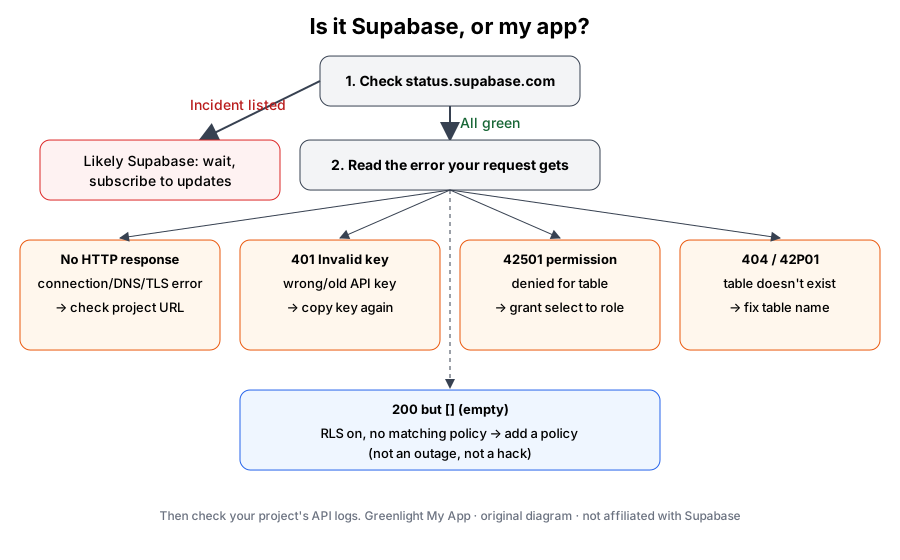 Is it Supabase, or my app? Original diagram by Greenlight My App.
- Status page (1 minute). Open status.supabase.com (external). Read the banner and open incidents. Matching incident? Wait and subscribe.
- Key and URL (1 minute). Compare the project URL and the publishable or anon key in your app's env settings with your project's API settings. A 401 or no response at all points here. (Is it safe that this key is public? See is my Supabase anon key safe?)
- RLS and grants (2 minutes). Empty list? Check policies. 42501? Check grants, especially on tables created after Oct 30, 2026.
- Logs (1 minute). Your project's logs in the Supabase dashboard show the status code each request got.
- Your public code. While you're there, make sure no secret key ended up in your frontend. If you're new to how all of this fits together, start with what is Supabase?
FAQ
How do I check if Supabase is down right now? Open status.supabase.com and read the banner, any open incidents and the components your app uses, such as Data APIs, Auth and Postgres. You can also read the public JSON at status.supabase.com/api/v2/status.json. If no incident matches what you see, check your key, URL, RLS and grants next.
Why does my Supabase app return an empty array? A common cause is that Row Level Security is on and no policy allows that read. Supabase returns HTTP 200 with an empty list, not an error. In our test, the same request returned 3 fake rows with a read policy and an empty list without one. Add a policy for the role your app uses.
What does "permission denied for table" (42501) mean? It means the database role your request uses, such as anon or authenticated, has no GRANT on that table. It isn't an outage. Grant the access the role needs, for example select, then add RLS policies to control which rows it sees. From Oct 30, 2026, new tables need this explicitly.
Why can't I log in to Supabase? If it's the Supabase dashboard, check the status page for dashboard, Auth or Management API incidents first. If it's your own app's login, check the Auth component on the status page, then your app's key, project URL and auth settings. An error code from the request usually points to the cause.
Will the October 30 change make my app look like it's down? It can. From Oct 30, 2026, new tables in existing projects aren't exposed to the Data API until you grant access. Requests to them fail with 42501, which looks like downtime. Existing tables keep their grants. Add the grants when you create new tables.
Should my app handle Supabase outages? Yes. Show a friendly message, retry reads a few times with growing waits, avoid retrying writes blindly, and log status codes on your side. Never show raw error objects or keys to visitors. That way a short outage looks like a hiccup, and you can tell real downtime from your own errors.
Supabase is up? Check your app next.
Supabase is up and your app still acts strange? Scan your app before launch with Greenlight My App's free scan. It checks for exposed keys and tables your public key can read. It's automated, read-only and educational, not a security audit, and "nothing found" isn't a guarantee that nothing is exposed. Run a free scan (external).
Sources
On this site
Related posts
What Is Supabase? A Plain-English Guide for App Builders
What is Supabase? A plain-English guide to the Postgres backend for Lovable and Bolt apps: what's public by design, what RLS does, and how to check yours.
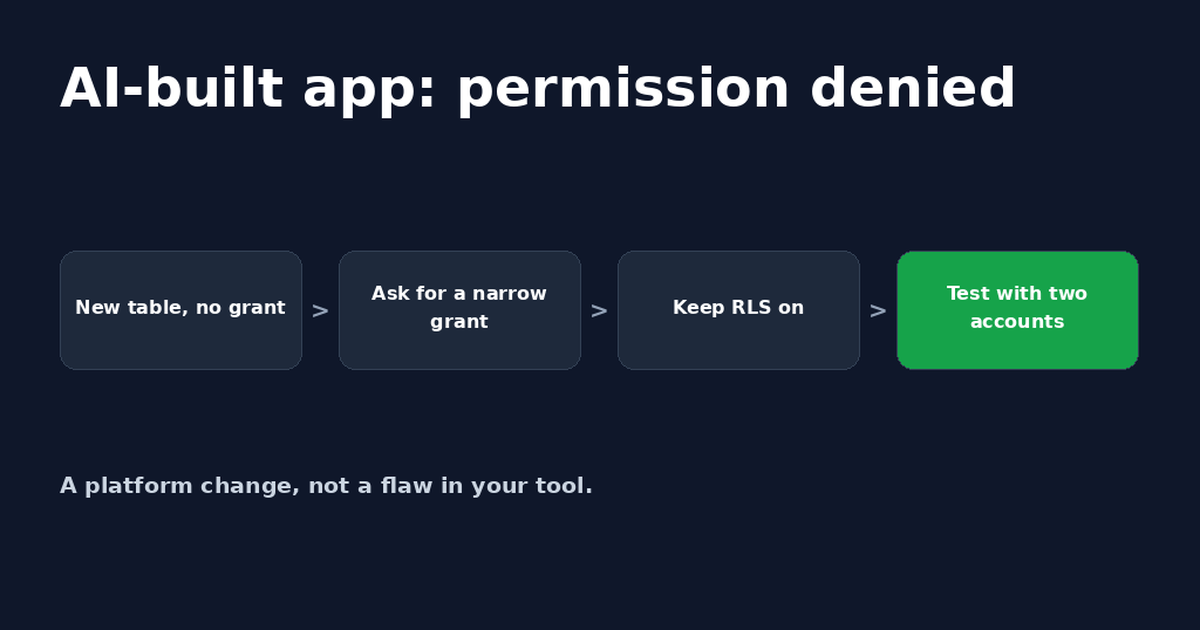
Lovable Supabase Permission Denied? Fix for Bolt Apps Too
A Lovable or Bolt app saying Supabase permission denied usually means a new table has no GRANT. A safe prompt for your AI tool and how to check it.
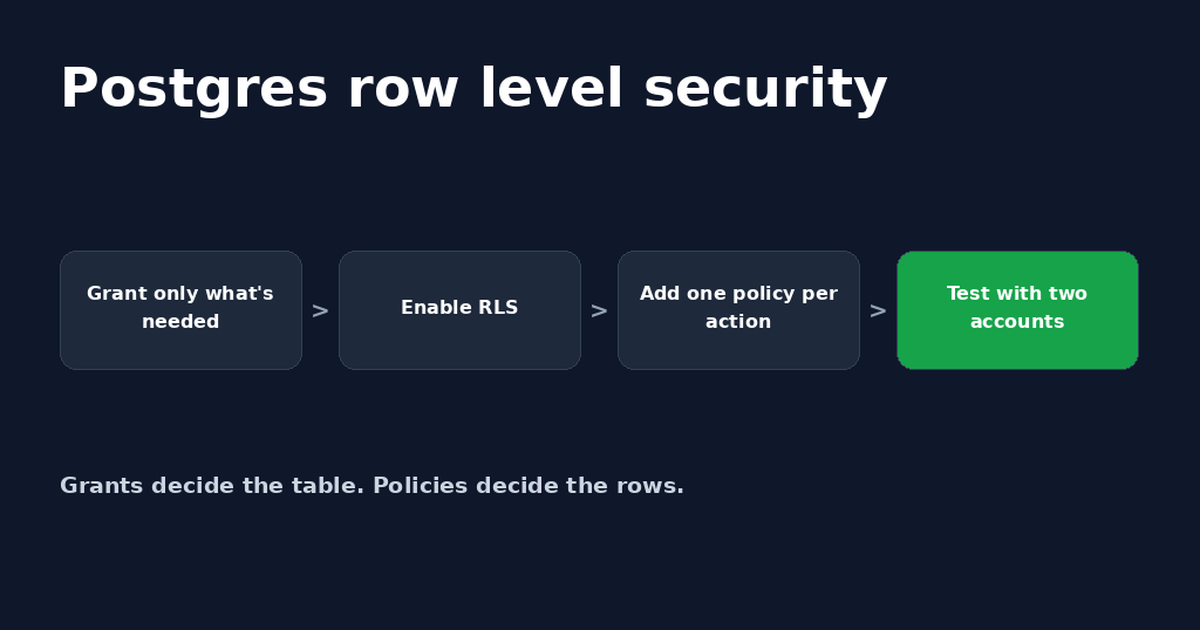
Postgres Row Level Security: A Supabase Guide
Postgres row level security decides which rows each user can read or change. Set it up in Supabase, write policies and fix common errors.


Get the next change before it bites
Greenlight tips and new blog posts: short, practical notes when Supabase, Lovable, Bolt, Cursor or another tool you build with changes something that affects your app, plus what to check. About twice a month.
We'll send a confirmation email first. Unsubscribe anytime. Privacy. Greenlight My App is independent and not affiliated with or endorsed by Supabase, Lovable, Bolt, Cursor or any other tool we mention.
Greenlight My App is independent and not affiliated with or endorsed by Supabase, the PostgREST project, the PostgreSQL project, Lovable, StackBlitz (Bolt) or Anysphere (Cursor). Supabase, PostgREST, PostgreSQL, Lovable, Bolt and Cursor are trademarks of their owners. Status details are quoted from Supabase's own status page as of Oct 23, 2026. This page is general information, not professional security advice, legal advice, a security audit or a guarantee. Check your own setup against the vendor's current docs.