Firebase Security Rules: We Tested Open vs Locked Rules
Firebase security rules decide who can read and write your Firestore, Realtime Database and Storage data. Your public API key doesn't protect data. The rules do, so lock them before launch.

On this page
- What are Firebase security rules?
- Is Firebase secure if my API key is public?
- What does Firebase "test mode" actually allow? We tested it.
- Firestore rules: from wide open to owner-only
- Why "rules aren't filters" trips people up
- Firebase Realtime Database rules (a different syntax)
- Firebase Storage rules for uploads
- How do I test Firebase security rules before launch?
- What does Firebase App Check add (and what doesn't it)?
- Firebase rules pre-launch checklist
- What our scanner shows for a Firebase app
- FAQ
- Check your app before launch
Firebase security rules decide who can read and write the data in your Firestore database, Realtime Database and Cloud Storage bucket. Your app's Firebase config, API key included, is public by design. The rules are what stand between that public config and your users' data. We tested open rules and locked rules side by side on Firebase's local emulator, and this guide shows what got through.
By Gary, Greenlight My App · Updated Oct 28, 2026 · How we checked this: on Oct 28, 2026 (about 7:00 to 7:05 AM ET) we ran the Firebase Local Emulator Suite on our own machine with a demo project (demo-greenlight) and fake data only. We swapped in each rule set and sent plain REST requests with and without a fake signed-in user, then ran rules unit tests. No Google account, no real Firebase project and no rules deployed anywhere. Firebase's public docs were read the same morning. Drafted with AI tools and reviewed by a person before publishing.
What are Firebase security rules?
Firebase security rules are the rules that decide whether each read or write is allowed when a browser or app talks straight to Firestore, the Realtime Database or Cloud Storage. When there's no server of yours in between, the rules are your access control.
In a typical app built with an AI tool, the frontend calls Firebase directly. There is no backend of yours checking requests first. So every request is judged by the rules alone: who is signed in (request.auth), what they are asking for, and what the data looks like.
Each product has its own rules file. Firestore and Cloud Storage use a rules language with match and allow statements. The Realtime Database uses JSON with .read and .write keys. All three are covered below, with results from our emulator run.
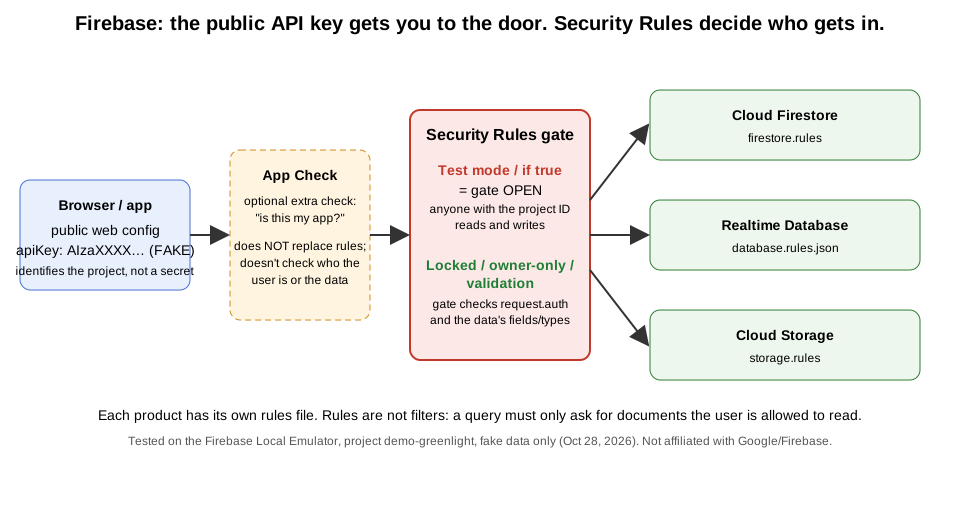 The public key gets a request to the door. Security Rules decide who gets in. Original diagram by Greenlight My App, based on Firebase's docs (Oct 28, 2026).
Is Firebase secure if my API key is public?
It can be, if your rules are right. Firebase's docs say API keys for Firebase services only identify your project and app, and that authorization comes from IAM permissions, Security Rules and App Check. Keys restricted to Firebase APIs don't need to be treated as secrets. Open rules, not the visible key, are the risk.
So a firebase api key showing up in your page source is expected. Firebase's API keys page (external), checked Oct 28, 2026, adds two cautions: apply API restrictions to every key, and use a separate, restricted key for other Google APIs. It says a key for the Gemini Developer API must never be in your code. If you want the general idea of public versus secret keys, see what an API key is (external). For how Firebase's public key compares with Supabase's, see our Supabase vs Firebase comparison (external).

What does Firebase "test mode" actually allow? We tested it.
Firebase's docs say test mode grants access to all users. In our emulator test, a test-mode rule and an if true rule both let a request with no sign-in list every document and write a new one. Locked rules (if false) denied the same requests, even for a signed-in user.
When you create a database or bucket in the Firebase console, the docs say you choose Locked mode (deny everyone) or Test mode (allow everyone). The insecure-rules page (external) warns that if your rules are open, anyone who guesses your project ID can steal, change or delete your data.

Here is the test-mode rule we used (yours will show its own date). It allows everything until a set date, and we used a date 30 days out:
rules_version = '2';
service cloud.firestore {
  match /databases/{database}/documents {
    match /{document=**} {
      allow read, write: if request.time < timestamp.date(2026, 11, 27);
    }
  }
}
Results from the emulator, with fake data only:
| Rule set | Request | Signed in? | Result |
|---|---|---|---|
| Test mode (open until a date) | List all notes | No | Allowed (all 3 fake docs returned) |
| Test mode | Create a doc | No | Allowed |
allow read, write: if true | List all notes | No | Allowed |
allow read, write: if true | Create a doc | No | Allowed |
Locked (if false) | List all notes | No | Denied (403) |
Locked (if false) | Create a doc | No | Denied (403) |
Locked (if false) | List all notes | Yes | Denied (403) |
Source: our emulator run, Oct 28, 2026 (Firebase Local Emulator Suite, project demo-greenlight).


The time limit is a deadline, not protection. Until that date passes, anyone can read and write. When it passes, everything is denied, including your own app, and people often "fix" that by pushing the date out or switching to if true. Neither makes the data safe.
Firestore rules: from wide open to owner-only
Good Firestore rules start locked and open only what each user needs. A common pattern is owner-only: a user can read and change a document only if its owner field matches their user ID. In our test, that let a user read their own note and blocked everyone else.
Here are the four steps we tested, in order. Each is a complete set of firestore security rules you can compare with your own.
1. Wide open (never ship this). Firebase's docs mark this ruleset "NEVER use this ruleset in production".
match /{document=**} {
  allow read, write: if true;
}
2. Locked. Nothing from the browser gets in. Fine before you write real rules.
match /{document=**} {
  allow read, write: if false;
}
3. Owner-only. Each note has an owner field holding the user's ID.
match /notes/{noteId} {
  allow read, update, delete: if request.auth != null
    && request.auth.uid == resource.data.owner;
  allow create: if request.auth != null
    && request.auth.uid == request.resource.data.owner;
}
4. Owner-only plus data validation. This rule only accepts the fields you expect, with the right types. Firebase's docs describe checking incoming data through request.resource.data.
match /notes/{noteId} {
  allow create: if request.auth != null
    && request.resource.data.keys().hasOnly(['owner', 'title', 'body'])
    && request.resource.data.keys().hasAll(['owner', 'title'])
    && request.resource.data.owner == request.auth.uid
    && request.resource.data.title is string
    && request.resource.data.title.size() > 0
    && request.resource.data.title.size() <= 100;
}
(Our tested version also allowed an optional body field if it was a string.)

Why "rules aren't filters" trips people up
With owner-only rules, our signed-in test user asked for the whole notes collection. She owns one of the three notes, but the whole request was denied. Firebase's docs (external) explain why: rules are not filters, and queries are all or nothing. If a query could return any document the user can't read, the entire request fails. When the same user ran a query limited to owner == her ID, it was allowed and returned only her note.
So the fix is in your app's query, not in loosening the rules. Ask for what the user is allowed to see.

The bad write in our validation test tried to save a number as the title and sneak in an extra isAdmin: true field. It was denied. Without validation, a user could write any fields they like into their own documents, including ones your app might later trust.
Firebase Realtime Database rules (a different syntax)
Firebase Realtime Database rules are written in JSON, with .read and .write keys on paths in your data tree. Open rules let anyone read the whole database in one request. In our test, auth != null still let any signed-in user read everything, so per-user paths were the version that actually separated users.
Three versions of these firebase database rules, from open to per-user:
{ "rules": { ".read": true, ".write": true } }{ "rules": { ".read": "auth != null", ".write": "auth != null" } }{
"rules": {
"users": {
"$uid": {
".read": "$uid === auth.uid",
".write": "$uid === auth.uid"
}
}
}
}We sent a plain read of the database root (/.json) under each one:
| Rules | Request | Signed in? | Result |
|---|---|---|---|
.read: true | Read the whole tree | No | Allowed |
auth != null | Read the whole tree | No | Denied (401) |
auth != null | Read the whole tree | Yes | Allowed (every user's records) |
Per-user $uid | Read the whole tree | No | Denied (401) |
Per-user $uid | Read the whole tree | Yes | Denied (401) |
Per-user $uid | Read /users/<own ID> | Yes | Allowed |
Per-user $uid | Read another user's path | Yes | Denied (401) |
Source: our emulator run, Oct 28, 2026.

The middle row is the one to watch. Firebase's insecure-rules page flags it too: if a rule uses auth != null, confirm that you want any logged-in user to have access to the data. If your app lets anyone sign up, that is close to open.
Firebase Storage rules for uploads
Firebase Storage rules control who can download and upload files in your bucket. With if true, our request with no sign-in downloaded a user's file and uploaded a new one. With rules that allow each signed-in user only their own folder, both were denied, and the user could still use their own folder.
The two versions of firebase storage rules we tested:
// Open (don't ship)
match /b/{bucket}/o {
  match /{allPaths=**} {
    allow read, write: if true;
  }
}

// Own folder only
match /b/{bucket}/o {
  match /users/{userId}/{fileName} {
    allow read, write: if request.auth != null && request.auth.uid == userId;
  }
}| Rules | Request | Signed in? | Result |
|---|---|---|---|
if true | Download a user's file | No | Allowed |
if true | Upload a file | No | Allowed |
| Own folder only | Download a user's file | No | Denied (403) |
| Own folder only | Upload a file | No | Denied (403) |
| Own folder only | Download own file | Yes | Allowed |
| Own folder only | Upload to own folder | Yes | Allowed |
| Own folder only | Upload to another user's folder | Yes | Denied (403) |
Source: our emulator run, Oct 28, 2026.

Open upload rules are a separate problem from open reads: anyone could put files in your bucket. We didn't measure cost or abuse in this test; we only checked whether each request was allowed.
How do I test Firebase security rules before launch?
Run them on the Firebase Local Emulator Suite and write unit tests that expect both successes and failures. Firebase's docs recommend the emulators for developing rules and show unit tests with its rules-unit-testing library. Our six tests all passed in about 1.5 seconds.
What we did, which you can copy with your own rules:
- Start the emulators with a demo project ID (we used
demo-greenlight), so nothing touches a real Firebase project. - Seed a few fake records, including one owned by a fake test user.
- Write tests with
@firebase/rules-unit-testing, as in Firebase's unit test docs (external):assertSucceedsfor what should work (a user reading their own note) andassertFailsfor what shouldn't (no user, another user's note, a bad write). - Watch the Emulator UI's Requests tab. It shows each request and which rule line allowed or denied it, like the screenshots above.

Firebase's docs also describe a rules simulator (the Rules Playground in the Firebase console) for simulating signed-in and signed-out requests. It works on a real project, so we used the Emulator UI instead and don't show it here. Firebase's docs recommend more thorough testing with the emulator before you deploy.
If an AI tool wrote your rules, run these tests before you trust them. A rule can look strict and still let more through than you expect, like auth != null in the Realtime Database test above. A failing assertFails test shows you that before your users do.
What does Firebase App Check add (and what doesn't it)?
Firebase App Check helps confirm that requests come from your real app on a real device, using attestation providers. Firebase's docs say it prevents some, but not all, abuse and doesn't guarantee to stop it all. It doesn't decide which user can read which data. That is still your security rules' job.
Firebase's API keys page puts it this way: Security Rules control which end users can access resources, and firebase app check controls which apps can. So they answer different questions. App Check asks "is this my app?" Rules ask "is this user allowed to read this document?" A request from your real app, made by a signed-in user, still needs rules that stop that user reading other people's data.

Firebase rules pre-launch checklist
Before you launch, make sure your firebase rules have no test-mode or if true lines, user data is owner-only, writes are validated, Storage is per user, and every rule set has passing emulator tests. Then restrict your API key and consider App Check.
| Check | What "done" looks like | Where it's covered |
|---|---|---|
| Test mode is gone | No request.time < open-until-a-date rule left | Test mode section |
No if true rules | Search all three rules files for if true and ".read": true | Firestore, Realtime Database and Storage sections |
| Owner checks on user data | request.auth.uid compared with the owner field or path | Owner-only rules |
auth != null isn't your only check | Signed-in users can't read each other's data | Realtime Database section |
| Writes are validated | Only expected fields and types are accepted | Validation rule |
| Storage is locked per user | Uploads and downloads limited to the user's own folder | Storage section |
| Rules tested on the emulator | Unit tests with both assertSucceeds and assertFails pass | Testing section |
| API key restricted | API restrictions applied; separate keys for non-Firebase APIs | API key section |
| App Check considered | Turned on where it fits, never instead of rules | App Check section |
| Server keys never in the browser | Service account keys and other secrets stay in server environment variables | What is a .env file? (external) |
If you also use Supabase, the same idea there is row level security. Our guides to Supabase RLS (external) and Postgres row level security (external) cover it. For a full pre-launch pass, use the Lovable launch checklist (external) or the Bolt.new launch checklist (external).
What our scanner shows for a Firebase app
We also ran the Greenlight My App scanner against a local demo page holding an obviously fake Firebase web config. The only related finding was an INFO note: "Google API key found in your code (usually OK)". That matches Firebase's docs on public keys. The scan does not check your Firebase security rules. It made no request to Firestore, the Realtime Database or Storage, so it can't tell you whether your rules are open. Use the emulator tests above for that.

FAQ
Is it safe that my Firebase API key is public? Yes, for a key restricted to Firebase services. Firebase's docs say these keys only identify your project and app, and that access is controlled by Security Rules, IAM and App Check, not by hiding the key. Apply API restrictions, keep other Google API keys separate, and make sure your rules aren't open.
What can hackers do with my Firebase API key?
On its own, a Firebase web API key identifies your project; it doesn't grant access to data. What someone can do depends on your security rules. If your rules are in test mode or use if true, anyone with your project details can read and write your data, as our emulator test showed. Locked, owner-only rules stop that.
How do I find the API key for a Firebase app?
For a web app, Firebase's docs say it's the apiKey field in your Firebase config object. For Apple apps it's in GoogleService-Info.plist, and for Android in google-services.json. You can see and manage all your project's keys on the Credentials page of the Google Cloud console, where you also apply restrictions.
What does Firebase test mode allow? Firebase's docs say test mode grants access to all users. In our emulator test, a test-mode rule let a request with no sign-in list every Firestore document and create a new one. A time-limited test rule only stops working on its end date, so treat it as open until you replace it.
How do I lock down Firestore rules?
Start from allow read, write: if false, then open only what each user needs. Compare request.auth.uid with an owner field so users reach only their own documents, and validate the fields and types on every write. Query only for documents the user may read, because rules aren't filters. Then test it all on the emulator.
Are Firebase rules the same for Firestore, Realtime Database and Storage?
No. Each product has its own rules. Firestore and Cloud Storage use the same rules language with match and allow statements, but separate files and paths. The Realtime Database uses JSON with .read and .write keys. You need to lock down each product your app uses; securing one doesn't secure the others.
How do I test Firebase security rules?
Use the Firebase Local Emulator Suite with a demo project and fake data, and write unit tests with the @firebase/rules-unit-testing library. Include tests that should fail, such as reading another user's data. The Emulator UI's Requests tab shows which rule line allowed or denied each request. The console's Rules Playground works on a real project.
Does App Check replace security rules? No. Firebase's docs say App Check uses attestation to help confirm requests come from your authentic app and prevents some, but not all, abuse. It doesn't decide which user can read which data. Security Rules do that. Use App Check alongside locked, owner-only rules, never instead of them.
Check your app before launch
Built your app on Firebase with Lovable, Bolt, Cursor, Replit or v0? Scan your app before launch with Greenlight My App's free scan. It looks for keys and settings that shouldn't be there in your homepage and up to 15 of the scripts it loads. It doesn't test your Firebase security rules, so run the emulator checks above too. The scan is automated, read-only and educational, not a security audit, and "nothing found" isn't a guarantee that nothing is exposed.
Sources
- Firebase docs: Get started with Security Rules (external)
- Firebase docs: Avoid insecure rules (external)
- Firebase docs: Writing conditions for Cloud Firestore Security Rules (external)
- Firebase docs: Securely query data (rules are not filters) (external)
- Firebase docs: Build unit tests (external)
- Firebase docs: API keys for Firebase (external)
- Firebase docs: App Check (external)
On this site
Related posts

Supabase vs Firebase: Which Is Safer for Your App? (2026)
Supabase vs Firebase for apps built with Lovable, Bolt or Cursor: what a stranger can read under each one's rules, free-plan limits, and when to pick each.

Get the next change before it bites
Greenlight tips and new blog posts: short, practical notes when Supabase, Lovable, Bolt, Cursor or another tool you build with changes something that affects your app, plus what to check. About twice a month.
We'll send a confirmation email first. Unsubscribe anytime. Privacy. Greenlight My App is independent and not affiliated with or endorsed by Supabase, Lovable, Bolt, Cursor or any other tool we mention.
Greenlight My App is independent and not affiliated with or endorsed by Google, Firebase, Lovable, StackBlitz (Bolt), Anysphere (Cursor), Replit or Vercel (v0). Firebase and Google are trademarks of Google LLC. All product names are trademarks of their owners. Firebase facts are paraphrased from Firebase's public docs as checked on Oct 28, 2026, and can change. This page is general information, not professional security advice, legal advice, a security audit or a guarantee. Check your own setup against the vendor's current docs.