Supabase vs Firebase: Which Is Safer for Your App? (2026)
Neither is inherently safer. Both put a public key in your app; what a stranger can read depends on Supabase's grants and RLS or Firebase's Security Rules, not on the key.

On this page
- Supabase vs Firebase: the short answer
- Firebase vs Supabase: how do they compare side by side?
- What does the public key in each app actually allow?
- We tested both: what can a stranger read under each setting?
- Supabase: RLS off, RLS with no policy, RLS with a policy
- Firebase: test-mode rules, locked rules, owner-only rules
- Is Supabase cheaper than Firebase?
- Which one do Lovable, Bolt, Cursor and v0 use?
- When should you pick Supabase, Firebase, or an alternative?
- A pre-launch safety checklist for either backend
- FAQ
- Built on Supabase or Firebase? Check your app before launch.
Supabase vs Firebase: which is safer? Neither one, on its own. Both platforms put a public key inside your app, and both expect that. What a stranger can read depends on the gate behind the key: grants and Row Level Security (RLS) in Supabase, Security Rules in Firebase. We tested both gates side by side with fake data, and the results below show exactly what leaks when each gate is left open.
By Gary, Greenlight My App · Updated Oct 26, 2026 · How we checked this: on Oct 26, 2026 (6:46 to 6:58 AM ET) we sent one request per setting. Supabase results come from a local stand-in (PostgreSQL 17 + PostgREST 12.2.3, the open-source engine behind Supabase's Data API), not a hosted Supabase project. Firebase results come from the Firebase Local Emulator Suite (firebase-tools 15.34.1, project demo-greenlight), not a live Google project. Fake rows and fake docs, keys redacted. Docs and pricing pages were read the same morning. Drafted with AI tools and reviewed by a person before publishing.
Supabase vs Firebase: the short answer
Supabase is a Postgres (SQL) database with Row Level Security. Firebase uses Cloud Firestore, a NoSQL document database guarded by Security Rules. In both, the key in your app is public by design, so the safety of your data depends on RLS or rules you write, not the key. Choose by data model, then lock the gate.
That is the whole firebase vs supabase safety story in one paragraph. The rest of this post shows it with real responses, so you can see what an open gate looks like before a stranger does.
If you are building with an AI tool like Lovable, Bolt, Cursor or v0, this matters more than usual. The tool writes the tables or collections for you, and it is easy to ship before anyone has looked at the gate. If you are new to Supabase itself, start with what is Supabase? (external)
Firebase vs Supabase: how do they compare side by side?
Supabase gives you SQL tables in Postgres, with access controlled by grants and RLS policies. Firebase gives you JSON-like documents in Firestore, with access controlled by Security Rules. Both include auth, file storage and server functions, and both have a no-cost plan with usage-based paid tiers above it.
| Feature | Supabase | Firebase |
|---|---|---|
| Database model | Postgres: tables, rows, SQL | Cloud Firestore: collections and documents (NoSQL) |
| How you query | SQL, or the auto-generated REST API (PostgREST) | Firestore SDKs or REST; no SQL joins |
| Auth | Supabase Auth | Firebase Authentication |
| File storage | Supabase Storage | Cloud Storage for Firebase |
| Server code | Edge Functions | Cloud Functions |
| Open source / self-host | Open-source stack you can run yourself | Managed Google service; emulator for local testing |
| Public key in your app | Publishable key (sb_publishable_...) or legacy anon key | Web config apiKey |
| The gate | GRANT on the table, then RLS policies | Security Rules |
| What an open gate looked like in our test | RLS off: 200, all 3 rows | Test-mode rules: 200, all 3 docs |
| Free plan (as of Oct 26, 2026) | Free: $0, 500 MB database, 50,000 MAU | Spark: no-cost, 1 GiB Firestore data, 50K reads/day |
| Paid model | Pro from $25/month plus usage | Blaze: pay as you go, with Spark's no-cost usage included |
Compared on Oct 26, 2026, from each platform's own docs and pricing pages. Our test results are from local stand-ins, not hosted projects.
What does the public key in each app actually allow?
Both keys are meant to be public, and neither decides what data a stranger sees. Supabase's docs say anyone can read the publishable key, so it reaches what RLS allows. Firebase's docs say its API keys identify your project, and Security Rules handle authorization. The secret keys are different and must never ship.
Here is what each platform says, in its own words (both pages read Oct 26, 2026):
- Supabase (API keys docs (external)): the publishable key is for "anything you ship" because "Anyone can read it, so it only reaches what Row Level Security allows." The secret key "bypasses Row Level Security, so it must never leave your control." The docs also say Supabase is deprecating the legacy anon and service_role keys by the end of 2026 in favor of publishable and secret keys.
- Firebase (API keys docs (external)): "API keys for Firebase services only identify your Firebase project and app," authorization "is handled through Google Cloud IAM permissions, Firebase Security Rules, and Firebase App Check," and keys restricted to Firebase services are "safe to include" in your code. The same page says to "review and apply appropriate restrictions" and to secure data "by using Firebase Security Rules. Don't rely only on restricting and/or obscuring your API keys."


So the risky key is never the public one. It is the Supabase secret or service_role key, or a Google service-account credential, ending up in your frontend. If that happened, read Supabase service role key exposed (external). For the Supabase public key in detail, see is my Supabase anon key safe? (external), and for public vs secret keys in general, what is an API key? (external)
We tested both: what can a stranger read under each setting?
With the gate open, everything: Supabase with RLS off returned all 3 fake rows to the public key, and Firestore test-mode rules returned all 3 fake docs with no sign-in. With the gate closed, nothing: RLS with no policy returned an empty list, and locked rules returned 403.
We used the same small dataset on both sides: 3 fake records, one marked public. Then we sent one request per setting.
| Platform | Setting | Request | What came back |
|---|---|---|---|
| Supabase (local stand-in) | RLS off | public anon key | HTTP 200, all 3 rows |
| Supabase (local stand-in) | RLS on, no policy | public anon key | HTTP 200, [] (no error) |
| Supabase (local stand-in) | RLS on + policy using (is_public = true) | public anon key | HTTP 200, 1 public row |
| Supabase (local stand-in) | New table, RLS + policy, anon grant removed | public anon key | HTTP 401, 42501 "permission denied for table demo_compare_new" |
| Supabase (local stand-in) | Same table after grant select ... to anon | public anon key | HTTP 200, 1 public row |
| Firebase (emulator) | Test-mode rules: allow read, write: if true (unsafe) | no auth at all | HTTP 200, all 3 docs |
| Firebase (emulator) | Locked: allow read: if false | no auth | HTTP 403, PERMISSION_DENIED |
| Firebase (emulator) | Owner-only rule | signed-in owner, own doc | HTTP 200, that doc |
| Firebase (emulator) | Owner-only rule | no user, same doc | HTTP 403 |
| Firebase (emulator) | Owner-only rule | signed-in user, someone else's doc | HTTP 403 |
| Firebase (emulator) | Owner-only rule | signed-in user, whole collection | HTTP 403 (the query has to filter by owner) |
Tested Oct 26, 2026, 6:46 to 6:52 AM ET, on a local PostgreSQL 17 + PostgREST 12.2.3 stand-in and the Firebase Local Emulator Suite. Hosted Supabase sits behind its own API gateway, so exact codes and messages there may differ.
Supabase: RLS off, RLS with no policy, RLS with a policy
The request was the same each time:
curl "$SUPABASE_URL/rest/v1/demo_compare?select=*" \
  -H "apikey: <PUBLISHABLE OR ANON KEY>" \
  -H "Authorization: Bearer <PUBLISHABLE OR ANON KEY>"

[]. Safe, but your app shows nothing.

The fix, before and after:
-- Step 1: turn RLS on (before this, anyone with the public key could read every row)
alter table demo_compare enable row level security;

-- Step 2: anon can read public rows, nothing else
create policy "public rows" on demo_compare
  for select to anon using (is_public = true);
Then there's the Oct 30 change. From Oct 30, 2026, Supabase says new tables in existing projects aren't exposed to the Data API automatically (changelog (external)). In our stand-in, a new table with RLS and a policy, but no grant, returned 401 with 42501. One grant select on demo_compare_new to anon; later, it returned the public row. So after Oct 30 there are two gates: the grant, then RLS. More in Supabase's Oct 30 change (external).

Firebase: test-mode rules, locked rules, owner-only rules
curl "http://127.0.0.1:8085/v1/projects/demo-greenlight/databases/(default)/documents/demo_compare"No API key and no sign-in were sent. In test mode the emulator returned every document anyway, because the rule said if true.
Unsafe: never ship test-mode rules. allow read, write: if true lets anyone read, change or delete every document.


The owner-only rule we used:
rules_version = '2';
service cloud.firestore {
  match /databases/{database}/documents {
    match /demo_compare/{id} {
      allow read: if request.auth != null
                  && request.auth.uid == resource.data.owner;
    }
  }
}
One surprise worth knowing: listing the whole collection as a signed-in user returned 403, even though that user owned one doc. Security Rules don't filter results for you. Your query has to ask for the user's own docs (for example, where("owner", "==", uid)), or the read is denied.
Is Supabase cheaper than Firebase?
It depends on how your app reads data. As of Oct 26, 2026, Supabase Free is $0 with unlimited API requests but a 500 MB database, while Firebase Spark is no-cost but caps Firestore at 50K document reads a day. On the free plans, read-heavy apps tend to reach Firebase's daily read cap first, and apps with larger databases tend to reach Supabase's 500 MB limit first.
Free-plan limits, as listed on each pricing page on Oct 26, 2026 (6:52 AM ET):
| Free plan item | Supabase Free | Firebase Spark |
|---|---|---|
| Price | $0/month | No-cost, "No payment method needed" |
| Database | 500 MB database size | 1 GiB Firestore stored data |
| Reads and writes | "Unlimited API requests" | 50K document reads, 20K writes, 20K deletes per day |
| Egress | 5 GB (plus 5 GB cached) | 10 GiB/month Firestore network egress |
| File storage | 1 GB | Not compared here |
| Monthly active users | 50,000 | 50K (SAML/OIDC: 50) |
| Other limits | 2 active projects; paused after 1 week of inactivity | Not compared here |
| Next step up | Pro from $25/month | Blaze, pay as you go |


The bills grow differently. Firestore is metered per document read, write and delete. Supabase's free plan is limited by database size, egress and MAU rather than request count. That's also why an open table matters for cost, not just privacy: anyone reading it uses your quota. Prices change, so check both pages on the day you decide.
For a full breakdown of Supabase plans, worked cost estimates and the spend cap, see Supabase pricing (external).
Which one do Lovable, Bolt, Cursor and v0 use?
It depends on the tool and your settings. As of Oct 26, 2026, Lovable's docs say its built-in backend is the default and is built on Supabase's open-source foundation, and you can connect your own Supabase project. Bolt's docs say new projects use Bolt Database by default, with Supabase available on paid plans.
What each builder's own docs said when we checked (Oct 26, 2026):
- Lovable: the Supabase integration docs (external) say "Lovable's built-in backend is enabled by default" and "utilizes Supabase's open-source foundation." You can connect a Supabase project you own instead. The same page warns: "Missing RLS policies are the most common way app data gets exposed."
- Bolt: the Supabase docs (external) say "By default, new projects use a Bolt database," and Supabase is available on Pro and Teams plans.
- Cursor and v0: Cursor is a code editor, so it uses whatever backend you or your project choose. For v0, check its current docs for your project. Either way, the same gates apply.
What this means before launch: if your app talks to Supabase, check RLS on every table and the grants on any table you add after Oct 30, 2026. If it talks to Firestore, make sure your rules aren't still if true. The basics are in what is Supabase RLS? (external), and for a wider look at the tools, see the best vibe coding tools (external).
Built on Supabase or Firebase with Lovable, Bolt, Cursor or v0? Scan your app before launch with Greenlight My App's free scan (external). It checks your public code for keys and settings that shouldn't be there.
When should you pick Supabase, Firebase, or an alternative?
Pick Supabase if your data is relational and you want SQL. Pick Firebase if your data fits documents and you want Google's mobile and realtime tooling. Look at an alternative if you need something neither offers. Whichever you pick, the gate (RLS or rules) is your job.
A short decision list:
- Pick Supabase if you think in tables and joins (orders, customers, invoices), want plain SQL, or want an open-source stack you could run yourself later.
- Pick Firebase if your data is naturally nested documents, you are building mobile-first, or you already use other Google Cloud services.
- Consider a supabase alternative such as self-hosted Postgres with your own API layer if you want full control of the database and are ready to run it. You trade convenience for control.
- Consider a firebase alternative such as another backend-as-a-service if you want document-style data without Google's billing model. Compare their access-control model before anything else.
We haven't tested other platforms, so we aren't ranking them here.
A pre-launch safety checklist for either backend
Before launch, check four things: every Supabase table has RLS and the right grants, no Firestore rule still says if true, no secret or service key is in your frontend bundle, and a scan of your live app finds nothing it shouldn't. Each takes minutes.
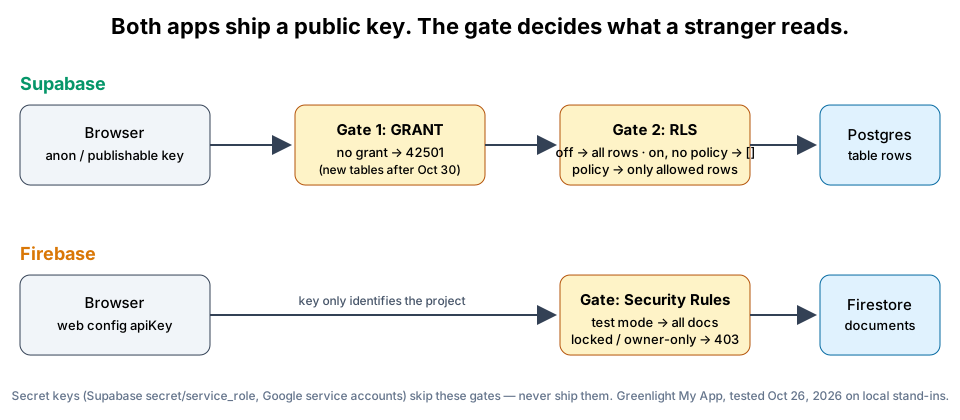 Both apps ship a public key. The gate decides what a stranger reads. Original diagram by Greenlight My App.
| Check | Supabase | Firebase | Risk if missed | How to fix |
|---|---|---|---|---|
| Gate is on | RLS enabled on every table | No allow read, write: if true | Anyone with the public key reads everything | Enable RLS / replace test-mode rules |
| Gate has the right rules | A policy per role (anon, authenticated) | Rules per collection, owner checks | Empty results, or too much data | Write policies or rules for each real use |
| New tables after Oct 30 | grant select ... to anon / authenticated where needed | n/a | 42501 errors that look like downtime | Add grants when you create tables |
| No secret keys in the app | No secret or service_role key in frontend code | No service-account credentials in frontend code | Full read and write, gates skipped | Move to server code, rotate the key |
| Test before launch | Read as anon with the public key | Read with no auth in the emulator | You find out from a stranger | Run one request per table or collection |
FAQ
Is Supabase cheaper than Firebase? It depends on your app. As of Oct 26, 2026, Supabase Free is $0 with unlimited API requests and a 500 MB database. Firebase Spark is no-cost with 1 GiB of Firestore data and 50K document reads a day. On the free plans, read-heavy apps tend to reach Firebase's daily read cap first, and apps with larger databases tend to reach Supabase's 500 MB limit first.
What are the downsides of Supabase? On the Free plan, projects pause after 1 week of inactivity, you get 2 active projects and a 500 MB database, as of Oct 26, 2026. If RLS is off on a table, the public key can read every row, as in our test, and from Oct 30, 2026, new tables need explicit grants. Both are easy to miss when an AI tool builds your tables.
Which is better than Supabase? No backend is better for every app. Firebase suits document-shaped, mobile-first apps. Self-hosted Postgres suits teams that want full control. Supabase suits relational data with SQL. Pick by data model and workflow, then check the access rules, because an open gate leaks data on any of them.
Is the Firebase API key secret? No. Firebase's docs say its API keys identify your project and app, and that keys restricted to Firebase services are safe to include in your code. Your data is protected by Security Rules and App Check, not by hiding the key. Keys for other Google APIs, such as Gemini, must stay secret.
Is the Supabase anon key safe to put in my app? Yes, that's what it's for. Supabase's docs say anyone can read the publishable key, so it reaches what Row Level Security allows. The legacy anon key works the same way. The danger is RLS being off: in our test, RLS off let the public key read every row.
Which one do Lovable and Bolt use? As of Oct 26, 2026, Lovable's docs say its built-in backend is the default and uses Supabase's open-source foundation, and you can connect your own Supabase project. Bolt's docs say new projects use Bolt Database by default, with Supabase available on paid plans. Check RLS either way.
Built on Supabase or Firebase? Check your app before launch.
Built on Supabase or Firebase with Lovable, Bolt, Cursor or v0? Scan your app before launch with Greenlight My App's free scan. It checks your public code for keys and settings that shouldn't be there. It's automated, read-only and educational, not a security audit, and "nothing found" isn't a guarantee that nothing is exposed.
Sources
- Supabase docs: API keys (external)
- Supabase docs: Row Level Security (external)
- Supabase changelog: tables not exposed to the Data and GraphQL API automatically (external)
- Firebase docs: API keys for Firebase (external)
- Firebase docs: Security Rules (external)
- Supabase pricing (external)
- Firebase pricing (external)
- Lovable docs: Connect to Supabase (external)
- Bolt docs: Supabase for databases (external)
On this site
Related posts

Supabase Pricing 2026: Free Tier Limits and Example Costs
Supabase pricing in plain English: what the free tier includes, when projects pause, what pushes you onto Pro, and three worked cost estimates. Oct 2026.
Is Supabase Down? How to Tell If It's Supabase or Your App
Is Supabase down, or is it your app? Check the status page, then decode 401, 42501, 404 and empty results in five minutes before you panic.
What Is Supabase? A Plain-English Guide for App Builders
What is Supabase? A plain-English guide to the Postgres backend for Lovable and Bolt apps: what's public by design, what RLS does, and how to check yours.


Get the next change before it bites
Greenlight tips and new blog posts: short, practical notes when Supabase, Lovable, Bolt, Cursor or another tool you build with changes something that affects your app, plus what to check. About twice a month.
We'll send a confirmation email first. Unsubscribe anytime. Privacy. Greenlight My App is independent and not affiliated with or endorsed by Supabase, Lovable, Bolt, Cursor or any other tool we mention.
Greenlight My App is independent and not affiliated with or endorsed by Supabase, Google or Firebase, the PostgREST project, the PostgreSQL project, Lovable, StackBlitz (Bolt), Anysphere (Cursor) or Vercel (v0). All product names are trademarks of their owners. Compared on Oct 26, 2026. Prices and plan limits are quoted from each vendor's public pricing page as of Oct 26, 2026, and can change. This page is general information, not professional security advice, legal advice, a security audit or a guarantee. Check your own setup against the vendor's current docs.