CORS Policy Explained: What It Is and When It's Unsafe
A CORS policy is the set of response headers your server sends to tell browsers which other websites may read its responses. It's set on the backend and enforced by the browser.

On this page
- What is CORS?
- What is a CORS policy (and is it backend or frontend)?
- How Access-Control-Allow-Origin works
- Credentials and CORS: where it gets risky. We tested it.
- What does a "blocked by CORS policy" error mean?
- Is it safe to enable CORS?
- Safe CORS settings checklist
- How to check your CORS settings before launch
- FAQ
- Check your app before launch
What is CORS? CORS (Cross-Origin Resource Sharing) is how your server tells browsers which other websites may read its responses. A CORS policy is just the set of headers your API sends, like Access-Control-Allow-Origin. Set it right and only your own site can read signed-in data. Set it wrong and any website can. We tested four setups locally to show which is which.
By Gary, Greenlight My App · Updated Oct 29, 2026 · How we checked this: on Oct 29, 2026 (about 6:57 to 7:00 AM ET) we ran a small local API with fake user data and a fake session cookie, then called it from "your site" and an "unknown site" in headless Chrome 156, with curl, and with the Greenlight My App scanner. Everything ran on 127.0.0.1; no real site or user data was touched. Standards facts come from MDN and the WHATWG Fetch Standard, read the same morning. Drafted with AI tools and reviewed by a person before publishing.
What is CORS?
CORS (Cross-Origin Resource Sharing) is an HTTP-header-based mechanism that lets a server say which other origins a browser should allow to read its resources. An origin is the scheme, domain and port together. By default, browsers stop a page on one origin from reading responses from another unless the server opts in with CORS headers.
Here's CORS explained in one example. Your app runs at https://app.example.com and your API at https://api.example.com. Those are different origins, so when your app's JavaScript calls the API, the browser sends an Origin header and checks the response for a matching Access-Control-Allow-Origin header. If it isn't there, the browser blocks the page from reading the answer.

For requests that could change data or that use custom headers, the browser first sends a "preflight": an OPTIONS request asking whether the real request is allowed. MDN's CORS guide (external) explains which requests are "simple" and skip it.
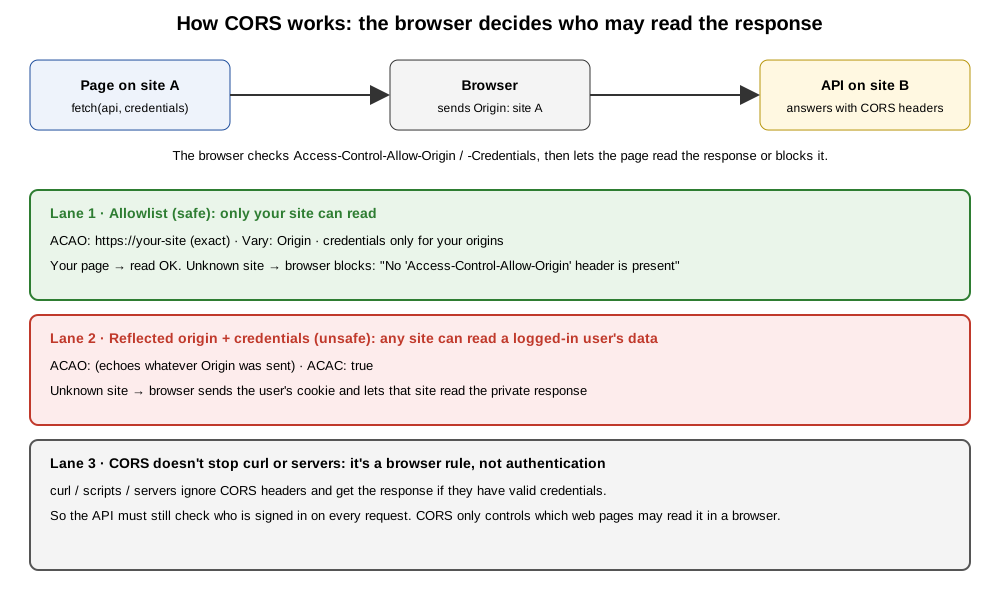 How CORS works and where it goes wrong. Original diagram by Greenlight My App, Oct 29, 2026.
What is a CORS policy (and is it backend or frontend)?
A CORS policy is the set of CORS headers your server sends, deciding which origins, methods, headers and credentials a browser may use with your API. It's configured on the backend and enforced by the browser. You can't fix a CORS policy from frontend code, because the page asking for access isn't the one that grants it.
The main CORS headers:
| Header | Sent by | What it does |
|---|---|---|
Origin | Browser | Says which origin the request came from |
Access-Control-Allow-Origin | Server | Names the origin allowed to read the response (or * for any, without credentials) |
Access-Control-Allow-Credentials | Server | true lets the browser include cookies and expose the response to the page |
Access-Control-Allow-Methods | Server (preflight) | Which methods, like GET or POST, are allowed |
Access-Control-Allow-Headers | Server (preflight) | Which request headers are allowed |
Vary: Origin | Server | Tells caches the answer depends on the Origin |
Source: MDN CORS guide and header reference pages, Oct 29, 2026.
So a CORS header is a permission slip for browsers. Every other kind of client ignores it.
How Access-Control-Allow-Origin works
Access-Control-Allow-Origin names the one origin allowed to read the response, or * for any origin. MDN says * only works for requests without credentials. With cookies, the server must name an exact origin, should send Vary: Origin, and should avoid the value null.
Three rules from MDN's header reference, as checked Oct 29, 2026:
- One origin, or
*. The header holds a single origin. To allow several, your server checks the request'sOriginagainst a list and returns the match. *and credentials don't mix. For credentialed requests, a wildcard is an error. The Fetch Standard (external) says the same: with credentials mode "include", the header can't be*.- Don't allow
null. Sandboxed anddata:documents have anullorigin, so any site can create one.

Here's how our safe setup (B, an exact allowlist) answered our own site versus an unknown one:

Credentials and CORS: where it gets risky. We tested it.
Access-Control-Allow-Credentials: true lets the browser send cookies and hand the response to the page. Paired with an API that echoes back any Origin, that let our unknown test site read a signed-in user's fake profile. An exact allowlist blocked it. A wildcard with credentials was refused by the browser.
We ran a local API at 127.0.0.1:8080 with one route, /api/profile, that returns fake profile data to anyone holding a fake session cookie. "Your site" ran at 127.0.0.1:8081 and an "unknown site" at 127.0.0.1:8082. Both called the API with credentials: "include". We tried four CORS setups.
| Setup | Headers sent to the unknown site | Your site (8081) | Unknown site (8082) | Greenlight My App free scan |
|---|---|---|---|---|
| A. No CORS | None | Blocked | Blocked | Not scanned |
| B. Exact allowlist | Only Vary: Origin | Read OK | Blocked | PASS: "No risky CORS settings found" |
| C. Reflected origin + credentials | Echoes any Origin, Allow-Credentials: true | Read OK | Read OK: read the signed-in fake profile | FAIL: "Any website can make logged-in requests to your app" |
D. Wildcard * + credentials | *, Allow-Credentials: true | Blocked | Blocked | WARN: "Your CORS uses a wildcard origin together with credentials" |
Source: our local test, Oct 29, 2026 (headless Chrome 156, fake data only).
Setup C is the real risk. The unknown site's page got a 200 and read the whole fake profile, because the API echoed its origin back and allowed credentials:

The preflight told the same story. Setup C approved an origin it had never heard of:

Setup D looks scary but the browser refused it. Chrome blocked even our own site, with the error MDN describes. The scan still warns, because a wildcard plus credentials usually means someone hand-built a CORS layer to allow credentials from anywhere, and a small change could make it reflect origins like setup C.


One caveat about our test. Our two sites were different origins (different ports) but the same "site" for cookie purposes, so the browser sent our SameSite=Lax test cookie. On real, separate domains, a cookie usually only goes along if it's set SameSite=None; Secure. That narrows the risk in setup C, but it doesn't make reflecting origins with credentials safe.
What does a "blocked by CORS policy" error mean?
A CORS error means the browser received the response but won't let your page read it, because the server's CORS headers didn't allow your origin. The request often reached the server. The fix is on the server: allow your exact origin, the methods and headers you use, and credentials only if you need cookies.
These are the two errors we saw in Chrome:
| Error message (excerpt) | What it means | Server-side fix |
|---|---|---|
| "has been blocked by CORS policy: No 'Access-Control-Allow-Origin' header is present on the requested resource" | The API didn't name your origin | Add your exact origin to the API's allowlist |
| "The value of the 'Access-Control-Allow-Origin' header ... must not be the wildcard '*' when the request's credentials mode is 'include'" | Wildcard sent with cookies | Return your exact origin instead of *, plus Vary: Origin |

In setup B, that error is the policy working: the unknown site is meant to be blocked. If your own site hits it, check the exact origin string, including https and the port. A trailing path or slash won't match, because an origin has no path.
Is it safe to enable CORS?
Yes, if you allow only the exact origins that need access and only allow credentials for them. A CORS misconfiguration happens when an API echoes back any Origin with credentials, allows null, or uses * on a private API. CORS never replaces authentication, because non-browser clients ignore it.
Our curl tests showed why. With the fake session cookie, curl read the fake profile under all four setups, including A with no CORS at all:
| Client | Does CORS apply? | In our test |
|---|---|---|
| A web page in a browser on another origin | Yes | Blocked or allowed by the headers |
| curl, scripts, other servers | No | Read the profile under every setup, when given the cookie |
Source: our local test, Oct 29, 2026.
So CORS controls which web pages can read your API in a visitor's browser. It doesn't decide who can call your API. That's your server's job: check the session or token on every request, and only return the signed-in user's own data.
Safe CORS settings checklist
Allow an exact list of your own origins, send Vary: Origin, allow credentials only for those origins, never reflect arbitrary origins or allow null, keep * for truly public data without cookies, and allow only the methods and headers you use. Then still check who's signed in on the server.
| Setting | Safe choice | Why |
|---|---|---|
| Allowed origins | Exact list of your own origins | Unknown sites get no CORS headers (setup B) |
| Reflecting the Origin header | Never for arbitrary origins | Let an unknown site read signed-in data (setup C) |
Vary: Origin | Send it with explicit origins | MDN recommends it so caches don't mix answers |
| Credentials | Only for your own origins, only if you need cookies | true is the only valid value; omit it otherwise |
null origin | Never allow it | Any site can create a document with a null origin |
* wildcard | Only for public data with no credentials | Browsers refuse it with credentials (setup D) |
| Preflight methods and headers | Only what your app uses | Smaller surface for other origins |
| Authentication | Check it on every request | CORS doesn't stop curl, scripts or servers |
Source: MDN CORS pages and our local test, Oct 29, 2026.
A worked example. Your app lives at https://app.example.com and calls https://api.example.com with cookies. A safe setup checks the incoming Origin. If it's exactly https://app.example.com, the API sends Access-Control-Allow-Origin: https://app.example.com, Access-Control-Allow-Credentials: true and Vary: Origin. For any other origin, it sends no CORS headers, and the browser blocks the page from reading the response.
If an AI tool added cors() with default settings, check what it allows before launch. Open your API's code or ask the tool to show the exact allowed origins, and change it to your own domains.
How to check your CORS settings before launch
Send a request with a made-up Origin header using curl or your browser's network panel. If the response echoes that origin back in Access-Control-Allow-Origin, especially with Access-Control-Allow-Credentials: true, fix it. Also make sure your API checks who is signed in, because CORS won't stop non-browser clients.
- Run
curl -s -D - -o /dev/null -H 'Origin: https://made-up.example' https://your-api.example/api/your-routeagainst an API route on your own site. - Look at the response headers. No CORS headers for the made-up origin is what you want, as in setup B.
- If
Access-Control-Allow-Originechoeshttps://made-up.example, and especially ifAccess-Control-Allow-Credentials: trueis there too, switch to an exact allowlist. - Repeat with
-X OPTIONSand-H 'Access-Control-Request-Method: POST'to see what the preflight allows. - Check your other headers too, with our security headers checker, plus guides on HSTS (external) and X-Frame-Options (external). Content-Security-Policy is a separate header that controls what your own pages load, not who can read your API.
Only test sites you own or have permission to test. If your API uses keys, our guide to what an API key is (external) explains which ones must stay on the server. For a full pre-launch pass, see the Lovable launch checklist (external) and the Bolt.new launch checklist (external).
Want a quick automated check? Run Greenlight My App's free scan. It sends a request from an unknown origin to your homepage and up to five API paths it finds in your homepage and up to 15 of the scripts it loads.
FAQ
Is CORS backend or frontend? CORS is configured on the backend and enforced by the browser. Your server sends headers like Access-Control-Allow-Origin, and the browser decides whether a page from another origin may read the response. You can't fix a CORS policy from frontend code, because the page asking for access isn't the one that grants it.
Is it safe to enable CORS? Yes, if you allow only the exact origins that need access and allow credentials only for them. It becomes unsafe when your API echoes back any Origin with credentials, allows null, or uses a wildcard on private data. In our local test, the echoing setup let an unknown site read a signed-in user's fake profile.
What does a CORS policy error mean? It means the browser got a response but won't let your page read it, because the server's CORS headers didn't allow your origin. The request often still reached the server. Fix it on the server by allowing your exact origin and the methods and headers you use, rather than trying to work around the browser.
How do I set up CORS? Configure it in your API or hosting layer. Check each request's Origin against a list of your own origins, and for a match send Access-Control-Allow-Origin with that exact origin plus Vary: Origin. Add Access-Control-Allow-Credentials: true only if you need cookies, and allow only the methods and headers your app uses.
How do I get rid of a CORS policy error (the right way)? Find which origin the browser says was blocked, then add that exact origin to your API's allowlist on the server. If the error mentions the wildcard and credentials, return your exact origin instead of *. Don't reflect every origin back to make the error go away; that's the unsafe setup from our test.
Does CORS protect my API from attackers? No. CORS only controls which web pages can read your API's responses inside a browser. In our test, curl read the fake profile under every CORS setup when given the session cookie. Your API still needs to check who is signed in on every request and return only that user's data.
Check your app before launch
Built your app with Lovable, Bolt, Cursor, Replit or v0? Scan your app before launch with Greenlight My App's free scan. It checks whether your API answers unknown websites in ways it shouldn't, by sending a request from an unknown origin to your homepage and up to five API paths found in your homepage and up to 15 of the scripts it loads. The scan is automated, read-only and educational, not a security audit, and a clean result doesn't cover every endpoint or mean your app is secure.
Sources
On this site
Related posts

What Is HSTS? We Tested the Header Before and After
What is HSTS? The Strict-Transport-Security header in plain English: max-age, includeSubDomains, preload, fixing "HSTS missing" and how to check it.
X-Frame-Options: Stop Clickjacking With One Header
X-Frame-Options tells browsers whether other sites may show your app in a frame. DENY vs SAMEORIGIN, CSP frame-ancestors, and host setup.


Get the next change before it bites
Greenlight tips and new blog posts: short, practical notes when Supabase, Lovable, Bolt, Cursor or another tool you build with changes something that affects your app, plus what to check. About twice a month.
We'll send a confirmation email first. Unsubscribe anytime. Privacy. Greenlight My App is independent and not affiliated with or endorsed by Supabase, Lovable, Bolt, Cursor or any other tool we mention.
Greenlight My App is independent and not affiliated with or endorsed by Mozilla (MDN), WHATWG, Google (Chrome), Lovable, StackBlitz (Bolt), Anysphere (Cursor), Replit or Vercel (v0). Product names are trademarks of their owners and are used only to identify the tools this guide covers. Standards facts are paraphrased from MDN and the WHATWG Fetch Standard as checked on Oct 29, 2026, and can change. This page is general information, not professional security advice, legal advice, a security audit or a guarantee. Check your own setup against the vendor's current docs.