CSP Header: Content Security Policy Explained + Examples
A CSP header (Content-Security-Policy) tells the browser which sources of scripts, styles, images and frames a page may load, blocking the rest. It's a strong defense against XSS and injected scripts.

On this page
- What is a CSP header?
- We tested it: no CSP
- How does Content Security Policy work?
- A content security policy example you can start from
- A real-world example: our home page's header
- How do you roll out CSP safely with Content-Security-Policy-Report-Only?
- We tested it: Report-Only
- How do a CSP nonce and strict-dynamic work?
- Step by step
- We tested it: enforced nonce + strict-dynamic
- Why should you avoid unsafe-inline?
- frame-ancestors vs X-Frame-Options: which should you use?
- How do you add a CSP header on your host?
- Vercel (vercel.json)
- Netlify and Cloudflare Pages (_headers)
- Next.js with a nonce (proxy.ts)
- Plain HTML (meta tag)
- What is CSP Level 3?
- Should you use a CSP generator?
- How do you check your CSP header?
- We tested it: scanner before and after
- FAQ
- Bottom line
What is a CSP header? A CSP header (Content-Security-Policy) is an HTTP response header that tells the browser which sources of scripts, styles, images and frames your page may load. Anything not on the list is blocked. It's one of the strongest defenses against cross-site scripting (XSS) and injected scripts.
By Gary, Greenlight My App · Updated Oct 30, 2026 · How we checked this: on Oct 30, 2026 (6:55 to 6:58 AM ET) we served one demo page in three versions on 127.0.0.1 (no CSP, Report-Only, enforced) and loaded each in headless Chrome 156 with a harmless injected script. We scanned the no-CSP and enforced versions with the Greenlight My App scanner (commit 5142e47) and fetched our home page's live headers with curl at 6:56 AM ET. We read MDN, the W3C CSP Level 3 draft and each host's header docs. We didn't test host dashboards, the meta tag, Firefox or Safari. Drafted with AI tools and reviewed by a person before publishing.
If your AI-built app shows user content anywhere, one bad input can turn into a script running in your users' browsers. A Content Security Policy is how you tell the browser "only run what I approved." Here's how to write one without breaking your site.
What is a CSP header?
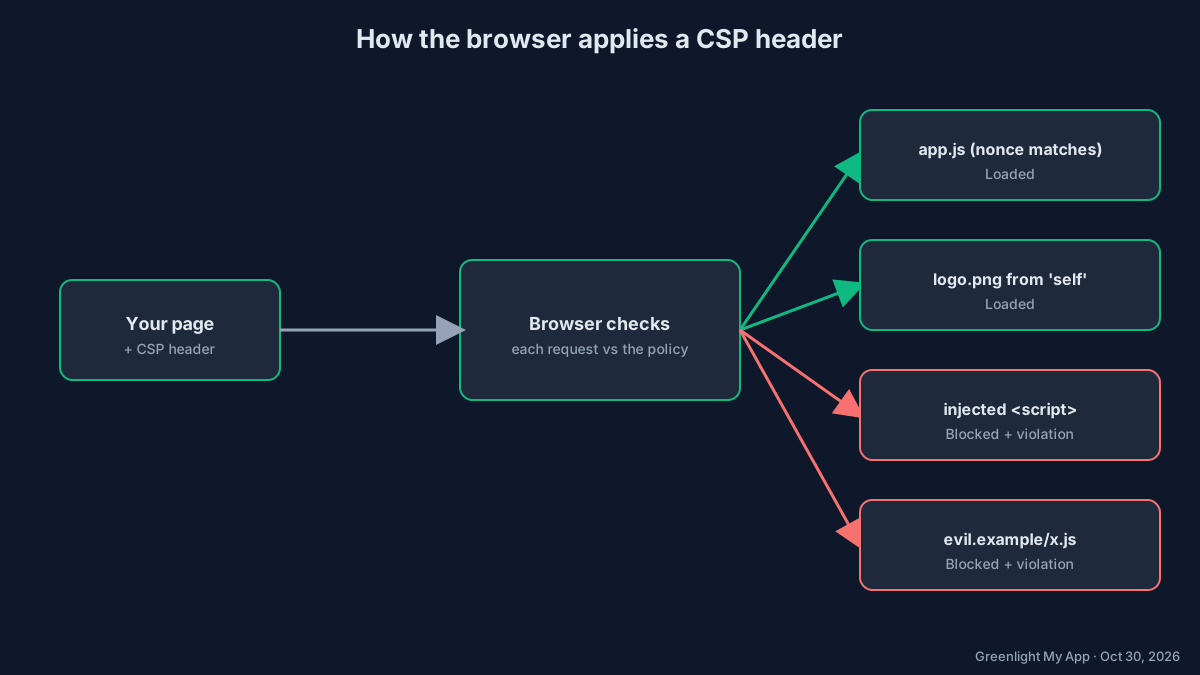
A CSP header is the Content-Security-Policy HTTP response header. Its value is a list of directives, such as script-src or img-src, each with the sources allowed for that type of resource. The browser checks every script, style, image, frame and connection against it and blocks what isn't allowed.
The smallest useful example:
Content-Security-Policy: default-src 'self'That one line tells the browser: only load resources from this page's own origin. Inline scripts, scripts from other domains and eval() are blocked by default, according to MDN (external).
Why it matters: in an XSS attack, someone gets their script into your page, for example through a comment field that isn't escaped. Without a CSP, the browser runs it like your own code. With a strict CSP, the browser refuses because the script isn't on your list.
We tested it: no CSP
On our demo page with no CSP (Chrome 156), both the real script and the injected one ran, and the page text changed to "injected".

Demo A, no CSP, Chrome 156, Oct 30, 2026.
How does Content Security Policy work?
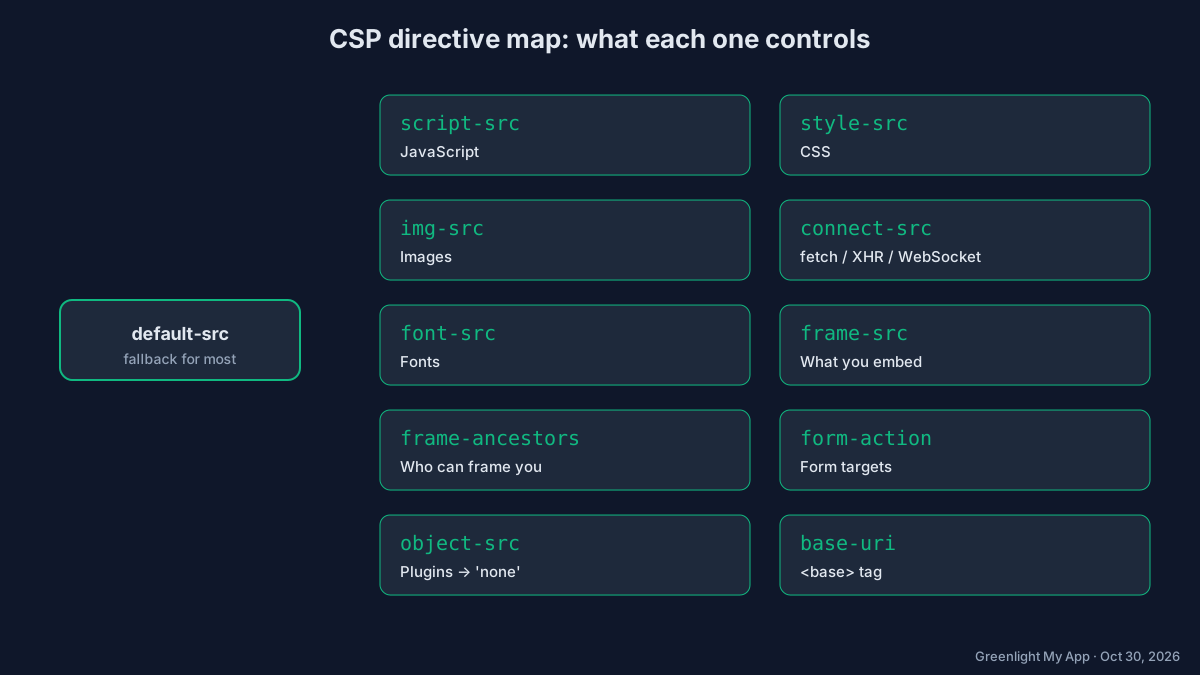
Each directive covers one type of resource. If a directive isn't set, most fall back to default-src. Sources can be keywords like 'self' and 'none', hostnames, schemes like https:, or a nonce or hash for a specific script.
| Directive | What it controls | Common safe value |
|---|---|---|
default-src | Fallback for most fetch directives | 'self' |
script-src | JavaScript | 'nonce-{random}' 'strict-dynamic' |
style-src | CSS | 'self' |
img-src | Images | 'self' data: |
connect-src | fetch, XHR, WebSocket | 'self' plus your API host |
font-src | Web fonts | 'self' |
frame-src | What you may embed in iframes | Only the embeds you use |
frame-ancestors | Who may frame your page | 'none' or 'self' |
base-uri | The <base> tag | 'self' or 'none' |
form-action | Where forms may submit | 'self' |
object-src | Plugins (<object>, <embed>) | 'none' |
upgrade-insecure-requests | Rewrites http:// requests to https:// | (no value) |
report-to / report-uri | Where violation reports go | Your report endpoint |
A content security policy example you can start from
A good starter is a strict, nonce-based policy: scripts only run if they carry the nonce your server generated for this response, plus anything those trusted scripts load. Everything else falls back to 'self', and plugins, base-tag tricks and framing are shut off.
Content-Security-Policy:
  default-src 'self';
  script-src 'nonce-{RANDOM}' 'strict-dynamic';
  style-src 'self';
  img-src 'self' data:;
  connect-src 'self';
  object-src 'none';
  base-uri 'self';
  form-action 'self';
  frame-ancestors 'none';
  upgrade-insecure-requests
Send it as one line in practice. Replace {RANDOM} with a fresh, unguessable value on every response.
A real-world example: our home page's header
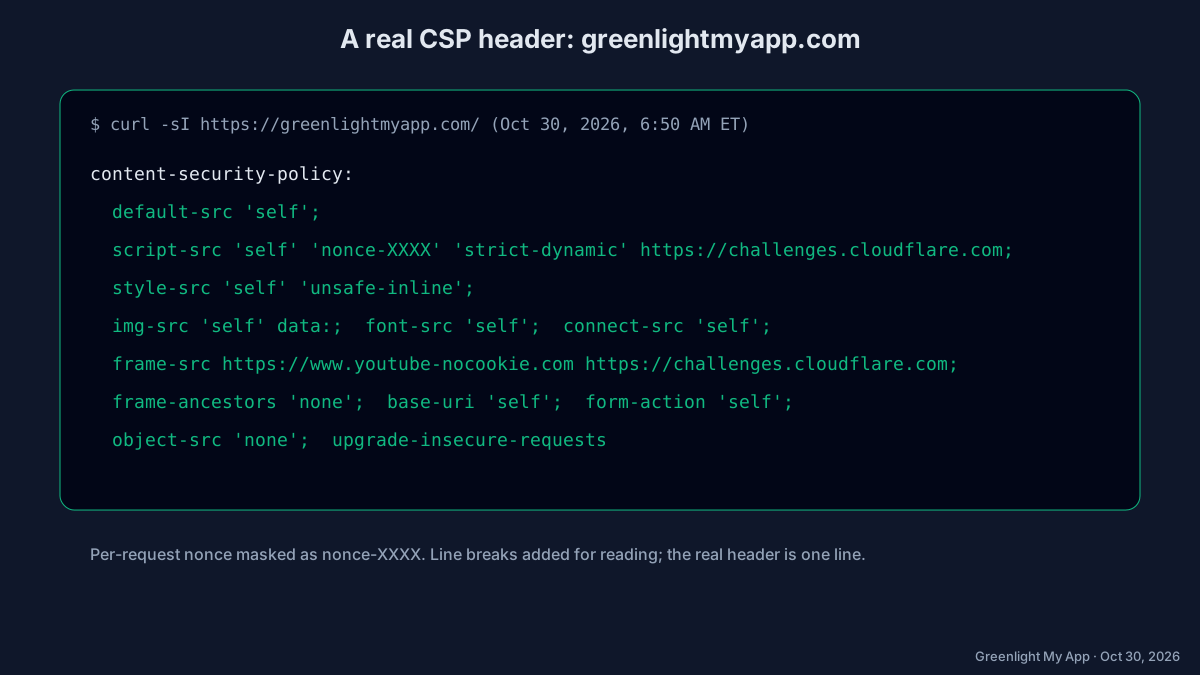
Here's the CSP our home page sent when we checked it with curl -sI https://greenlightmyapp.com/ on Oct 30, 2026 at 6:56 AM ET (nonce masked):
content-security-policy: default-src 'self'; script-src 'self' 'nonce-XXXX' 'strict-dynamic' https://challenges.cloudflare.com; style-src 'self' 'unsafe-inline'; img-src 'self' data:; font-src 'self'; connect-src 'self'; frame-src https://www.youtube-nocookie.com https://challenges.cloudflare.com; frame-ancestors 'none'; base-uri 'self'; form-action 'self'; object-src 'none'; upgrade-insecure-requestsTo be upfront: our policy still allows 'unsafe-inline' for styles. On our app pages, scripts use a nonce and 'strict-dynamic', which is where XSS risk is highest. Our blog pages still use a simpler policy that allows inline scripts, and tightening those, plus styles, is on our list.

Our home page's live headers, Oct 30, 2026, 6:56 AM ET. Nonce masked; request ID line removed.
How do you roll out CSP safely with Content-Security-Policy-Report-Only?
Send your policy in the Content-Security-Policy-Report-Only header first. The browser reports every violation in the console (and to your report endpoint if you set one) but doesn't block anything. Fix what it reports, then switch the same policy to the enforcing header.
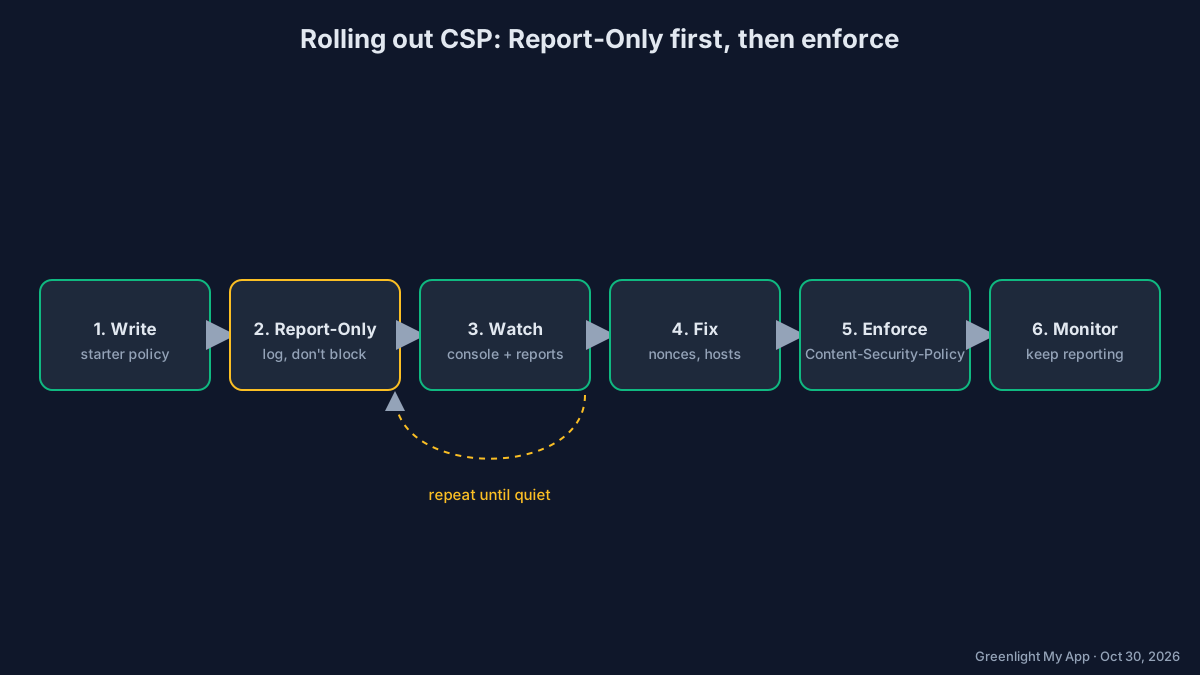
- Write the policy using the starter above.
- Send it as Report-Only:
Content-Security-Policy-Report-Only: default-src 'self'; script-src 'nonce-{RANDOM}' 'strict-dynamic'; object-src 'none'; base-uri 'self' - Click through your app. Open dev tools and watch the console for CSP violation messages.
- Fix each violation. Add a nonce to your own inline scripts, move inline handlers into script files, or allow a specific host you really need.
- Repeat until the console is quiet on every key page, including sign-in and checkout.
- Enforce. Rename the header to
Content-Security-Policy. You can keep a Report-Only header running alongside it to test the next, stricter version.
Two limits from MDN: Report-Only isn't supported in a <meta> tag, and the header on its own doesn't send reports anywhere unless you add report-to or report-uri (MDN: Report-Only (external)).
We tested it: Report-Only
With the policy sent as Content-Security-Policy-Report-Only, Chrome 156 logged the violation ("The policy is report-only, so the violation has been logged but no further action has been taken") and posted a report to our endpoint. The injected script still ran.

Demo B, Report-Only, Chrome 156, Oct 30, 2026.

The report our endpoint received from demo B.
How do a CSP nonce and strict-dynamic work?
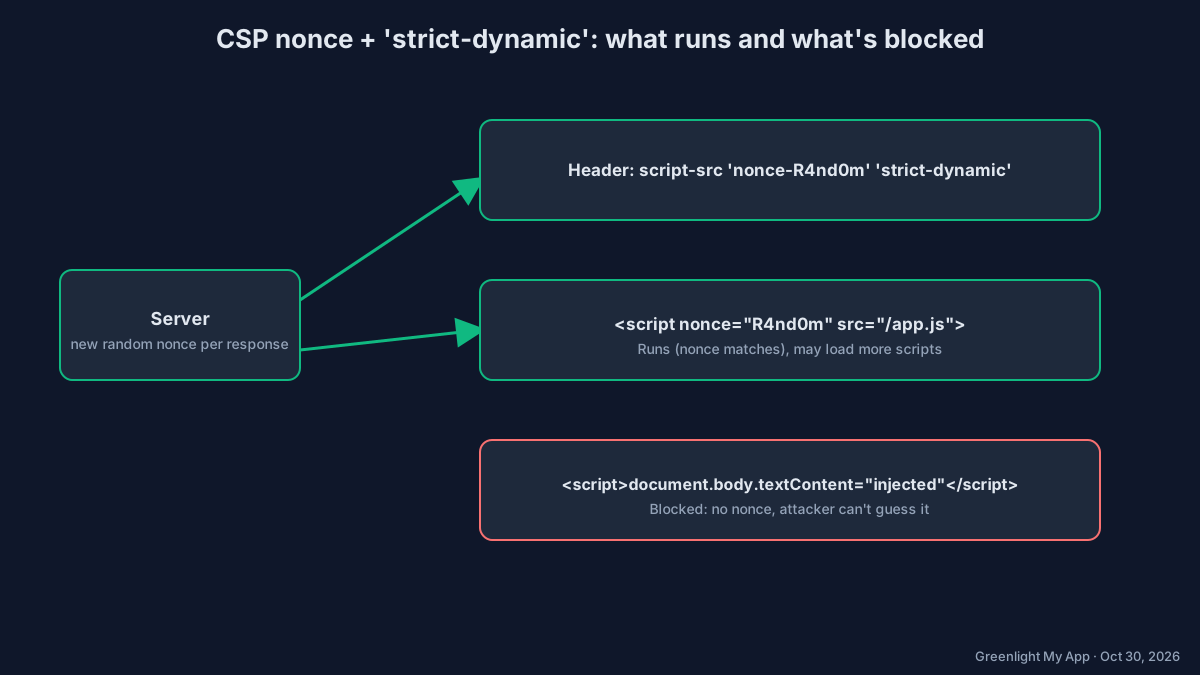
A nonce is a random value your server creates for each response. You put it in the header ('nonce-abc123') and on each script tag you trust (<script nonce="abc123">). The browser runs only scripts with the matching nonce. 'strict-dynamic' then lets those trusted scripts load further scripts without listing every host.
Step by step
- On each request, generate at least 128 bits of randomness and base64-encode it.
- Put it in the header:
script-src 'nonce-R4nd0m' 'strict-dynamic'. - Add
nonce="R4nd0m"to every<script>tag you serve. - An attacker who injects
<script>can't guess the nonce, so the browser blocks it.
<!-- runs: nonce matches the header -->
<script nonce="R4nd0m" src="/app.js"></script>

<!-- blocked: no nonce -->
<script>document.body.textContent = "injected"</script>
Never reuse a nonce across responses or hard-code it. A fixed nonce is as weak as no nonce. With 'strict-dynamic' present, supporting browsers ignore host allowlists and 'self' in script-src, which is why web.dev's strict CSP guide (external) recommends it.
We tested it: enforced nonce + strict-dynamic
With the same policy enforced (plus frame-ancestors 'none'), Chrome 156 blocked the injected script ("The action has been blocked"). The real script with the nonce ran, and the page text stayed "original text".

Demo C, enforced, Chrome 156, Oct 30, 2026.
Why should you avoid unsafe-inline?
'unsafe-inline' in script-src tells the browser to run any inline script on the page, including one an attacker injected. That cancels most of the XSS protection CSP gives you. Use nonces or hashes for the inline scripts you need instead.
| Instead of | Do this |
|---|---|
script-src 'unsafe-inline' | script-src 'nonce-{RANDOM}' 'strict-dynamic' |
onclick="..." attributes | addEventListener in a script file |
| A small fixed inline script | A 'sha256-...' hash of it |
'unsafe-eval' | Remove eval() / new Function() from your code |
Before and after for a typical AI-generated starter:
Before (weak):
Content-Security-Policy: script-src 'self' 'unsafe-inline' 'unsafe-eval'

After (strict):
Content-Security-Policy: script-src 'nonce-{RANDOM}' 'strict-dynamic'; object-src 'none'; base-uri 'self'
When a nonce or hash is present, browsers that support them ignore 'unsafe-inline', so some guides add it as a fallback for very old browsers. It's never a substitute.
frame-ancestors vs X-Frame-Options: which should you use?
Use frame-ancestors in your CSP. It controls which sites may put your page in an iframe, it supports exact allowlists, and the CSP spec says browsers should ignore X-Frame-Options when an enforced frame-ancestors policy is present. Many sites send both for older browsers.
Content-Security-Policy: frame-ancestors 'none'
X-Frame-Options: DENY
frame-ancestors doesn't work in a <meta> tag (MDN (external)). It must be a real header. More detail in our X-Frame-Options guide.
In our test, a page that tried to frame the enforced demo was refused by Chrome 156: the framing "violates ... frame-ancestors 'none'. The request has been blocked."

Framing test, Chrome 156, Oct 30, 2026.
How do you add a CSP header on your host?
Set it wherever your host lets you add response headers: vercel.json or next.config.js on Vercel, a _headers file on Netlify and Cloudflare Pages, or the proxy file for a per-request nonce in Next.js. A <meta> tag works for basic policies but can't do frame-ancestors or Report-Only.
The examples below use a simple static policy. For a nonce, you need code that runs per request (a Next.js proxy, middleware or a server), because a static header file can't create a new random value each time.
Vercel (vercel.json)
{
  "headers": [
    {
      "source": "/(.*)",
      "headers": [
        { "key": "Content-Security-Policy", "value": "default-src 'self'; object-src 'none'; base-uri 'self'; frame-ancestors 'none'" }
      ]
    }
  ]
}
See Vercel's headers docs (external).
Netlify and Cloudflare Pages (_headers)
Both read a _headers file in your publish folder (Netlify (external), Cloudflare Pages (external)):
/*
  Content-Security-Policy: default-src 'self'; object-src 'none'; base-uri 'self'; frame-ancestors 'none'
Next.js with a nonce (proxy.ts)
Next.js documents generating a nonce in proxy.ts (formerly middleware), setting it on the CSP header and reading it in your layout (Next.js CSP guide (external)). The core idea:
// proxy.ts (sketch, see the Next.js guide for the full version)
import { NextResponse } from "next/server";

export function proxy() {
  const nonce = btoa(crypto.randomUUID());
  const csp = `default-src 'self'; script-src 'nonce-${nonce}' 'strict-dynamic'; object-src 'none'; base-uri 'self'; frame-ancestors 'none'`;
  const res = NextResponse.next();
  res.headers.set("Content-Security-Policy", csp);
  res.headers.set("x-nonce", nonce);
  return res;
}
Plain HTML (meta tag)
<meta http-equiv="Content-Security-Policy" content="default-src 'self'; object-src 'none'; base-uri 'self'">| Feature | Header | <meta> tag |
|---|---|---|
| script-src, style-src, img-src etc. | Yes | Yes |
| frame-ancestors | Yes | No |
| Report-Only | Yes | No |
| report-uri / report-to | Yes | No |
| Covers content before the tag | Yes | No |
We didn't test these host setups on our own accounts. The syntax comes from each vendor's docs, so check them before you deploy.
What is CSP Level 3?
CSP Level 3 is the current W3C working draft of the standard. In plain words, it adds and standardizes newer tools such as 'strict-dynamic', report-to for reporting, and finer controls like script-src-elem and script-src-attr, while keeping the Level 2 basics like nonces and hashes.
You don't opt in to a "level". Browsers support each directive on its own, so check support for any directive you rely on. The spec lives at W3C: CSP Level 3 (external).
Should you use a CSP generator?
A generator can give you a starting draft, but check it before you copy it. Many produce host allowlists with 'unsafe-inline', which web.dev's strict CSP guide warns is easy to bypass. We haven't tested generator tools, so we're not recommending one.
Before you use any generated policy, check that it:
- Uses nonces or hashes for scripts, not
'unsafe-inline'. - Sets
object-src 'none'andbase-uri. - Includes
frame-ancestors. - Runs in Report-Only first.
How do you check your CSP header?
Open your browser's dev tools, go to the Network tab, click the page request and look under Response Headers for content-security-policy. Or run curl -sI https://your-site.com in a terminal. To check CSP alongside your other security headers at once, use a header scanner.
curl -sI https://your-site.com | grep -i content-security-policyWhat to look for:
- A
content-security-policyline exists (not only Report-Only). - No
'unsafe-inline'or'unsafe-eval'inscript-src. object-src 'none',base-uriandframe-ancestorsare set.- The nonce changes on every reload.
Our security headers checker flags a missing CSP and checks framing protection via frame-ancestors or X-Frame-Options. While you're there, check HSTS and your CORS policy too.
We tested it: scanner before and after
On the no-CSP demo, the Greenlight My App scanner (commit 5142e47) returned WARN "Content-Security-Policy is missing" and WARN "Clickjacking protection is missing". On the enforced demo, it returned PASS "Content-Security-Policy is set" and PASS "Clickjacking protection is set", via frame-ancestors (that demo sends no X-Frame-Options).

Local scan, demo A, Oct 30, 2026.

Local scan, demo C, Oct 30, 2026.
FAQ
What is a CSP header? A CSP header is the Content-Security-Policy HTTP response header. It lists which sources a page may load scripts, styles, images, frames and other resources from. The browser blocks anything not on the list, which limits what an injected script can do.
What is CSP Level 3? CSP Level 3 is the current W3C working draft of Content Security Policy. It builds on Level 2 with features like 'strict-dynamic', report-to reporting and separate controls for script elements and attributes. Browsers support directives one by one, so check support for the ones you use.
What's the difference between Content-Security-Policy and Report-Only? Content-Security-Policy enforces the policy and blocks violations. Content-Security-Policy-Report-Only applies the same rules but only reports violations, without blocking. Use Report-Only to test a policy safely, then switch to the enforcing header once your pages stop reporting problems.
Do I need unsafe-inline? Not for scripts, if you can avoid it. 'unsafe-inline' lets injected inline scripts run, which defeats much of CSP's XSS protection. Use a per-response nonce or a hash for inline scripts you need. Some sites still allow it for styles while they tighten scripts first.
Is a meta tag CSP as good as the header? No. A meta tag CSP can set most fetch directives, but it can't use frame-ancestors, Report-Only or reporting, and it doesn't cover anything before the tag. Send CSP as a response header whenever your host lets you set headers.
Does CSP replace X-Frame-Options? For framing, frame-ancestors is the modern replacement, and the spec says browsers should ignore X-Frame-Options when an enforced frame-ancestors policy exists. Many sites send both so older browsers stay covered. frame-ancestors only works as a real header.
How do I find missing security headers? Check your response headers in dev tools or with curl -sI, or run a free header scan. Our security headers checker flags a missing Content-Security-Policy, missing HSTS and missing framing protection, and explains each fix in plain words.
Will CSP break my site? It can if you enforce a strict policy straight away. That's why you start with Content-Security-Policy-Report-Only: it logs what would be blocked without blocking it. Fix each violation, then enforce the same policy.
Bottom line
A CSP header won't make your site secure on its own, but it sharply limits what an injected script can do. Start in Report-Only, use nonces with 'strict-dynamic', keep 'unsafe-inline' out of script-src, add frame-ancestors, and check the result.
Sources
On this site
Related posts

Is This Website Legit? 9 Checks You Can Run in 2 Minutes
Is this website legit? Run 9 quick checks: the URL, HTTPS certificate, domain age, contact details, reviews, payment options and security headers.

Has Been Blocked by CORS Policy: What It Means and How to Fix It
Has been blocked by CORS policy means your server didn't allow your origin. Fix it on Vercel, Supabase Edge Functions or Express, safely.

HSTS Missing From HTTPS Server (RFC 6797): What It Means and the Fix
HSTS missing from HTTPS server (RFC 6797) means no Strict-Transport-Security header. Why scanners flag it and how to add it on your host.


Get the next change before it bites
Greenlight tips and new blog posts: short, practical notes when Supabase, Lovable, Bolt, Cursor or another tool you build with changes something that affects your app, plus what to check. About twice a month.
We'll send a confirmation email first. Unsubscribe anytime. Privacy. Greenlight My App is independent and not affiliated with or endorsed by Supabase, Lovable, Bolt, Cursor or any other tool we mention.
Greenlight My App is independent and not affiliated with or endorsed by Mozilla (MDN), W3C, Google, Vercel, Netlify or Cloudflare. Product names are trademarks of their owners. Standards facts are paraphrased from MDN, the W3C CSP Level 3 draft and web.dev as checked on Oct 30, 2026. This page is general information, not professional security advice, legal advice, a security audit or a guarantee. Check your own setup against the vendor's current docs.