Next.js security update (Oct 2026): how to check whether your app needs it and update
Next.js shipped security fixes on Oct 14, 2026. Check your version, see which release to move to (16.4.1 or 15.5.28), then update and redeploy.
On this page
Short answer: On Oct 14, 2026, Next.js released security fixes in 16.4.1 and 15.5.28 for two critical issues and one high-severity issue. If your app uses Next.js, check which version you're on. If it's older than those, update to the patched release for your line, then rebuild and redeploy.
By Gary, Greenlight · Last checked against the Next.js security post and GitHub advisories: Oct 19, 2026 · Drafted with AI tools and reviewed before publishing.
After you update and redeploy, run a free Greenlight check on your live site. It runs automated checks on the basics from the outside (HTTPS, security headers, exposed keys). It is not a full security audit and it doesn't check your Next.js version.
What Next.js fixed
The Next.js security post (external) lists three issues. Here's each one in plain English, with who it applies to according to the official advisories.
1. Remote code execution in use cache functions that return typed arrays (Critical). GHSA-673q-mjm6-r5xr (external)
- Applies to apps using the App Router with Cache Components, where a
use cachefunction returns multiple typed arrays. - Affected versions: 16.0.0 through 16.4.0. Patched in 16.4.1.
- There's no known workaround. Next.js says to upgrade right away even if your app doesn't have functions like this.
2. Remote code execution in the Image Optimization API when SVG files are used (Critical, per the Next.js advisory). GHSA-2464-fhr4-w9xw (external) / CVE-2026-96889 (the CVE ID given in the Next.js security post; that CVE record, for the upstream library bug, is rated 7.8 High by its assigner)
- A memory bug in an upstream library used for Image Optimization, when Next.js runs on glibc-based Linux.
- Affected versions, as the advisory lists them:
>= 10.0.0 <= 15.5.27and> 16.0.0 <= 16.4.0. Patched in 15.5.28 and 16.4.1. (If you're on exactly 16.0.0, you still need 16.4.1 or later: 16.0.0 is in range for the other two issues.) - Workaround from the advisory: make sure the version of
sharpused by Next.js is 0.35.5 or later. Upgrading Next.js to a patched version makes package managers provide a fixedsharp.
3. Denial of service in the App Router with Server Actions (High). GHSA-p3m5-59mp-jv5r (external)
- Crafted requests to an App Router app with at least one Server Action can cause high CPU use that blocks other requests in the same process.
- Affected versions: 13.0.0 through 15.5.27, and 16.0.0 through 16.4.0. Patched in 15.5.28 and 16.4.1.
- Apps using only the Pages Router, or not using Server Actions, are not vulnerable to this one. There's no workaround besides upgrading.
Two of these have related React advisories (GHSA-xqc2-xf4c-x3h3 (external) and GHSA-h3gv-c5rc-p453 (external)) for the react-server-dom-* packages. Updating Next.js is the step Next.js asks for.
The official post doesn't say any of these are being used in attacks, and it doesn't say any hosting setup is exempt. Check your version wherever your app runs.
Step 1: Find your Next.js version (2 minutes)
No terminal? Open package.json in your project (in your editor, or in your GitHub repo) and find the line "next": "...". A ^ or ~ in front means your lockfile may hold a slightly newer version, so the terminal check below is more exact.
With a terminal, in your project folder:
npm ls next sharpThis prints the installed next version and, if your project has one, the sharp version.
Built with an AI tool such as Cursor, Claude Code, Bolt or Lovable? What matters isn't the tool, it's whether your project lists next in package.json. If it doesn't, this Next.js update isn't for your app (see the FAQ about the related React advisories).
Step 2: Find your line and where to move
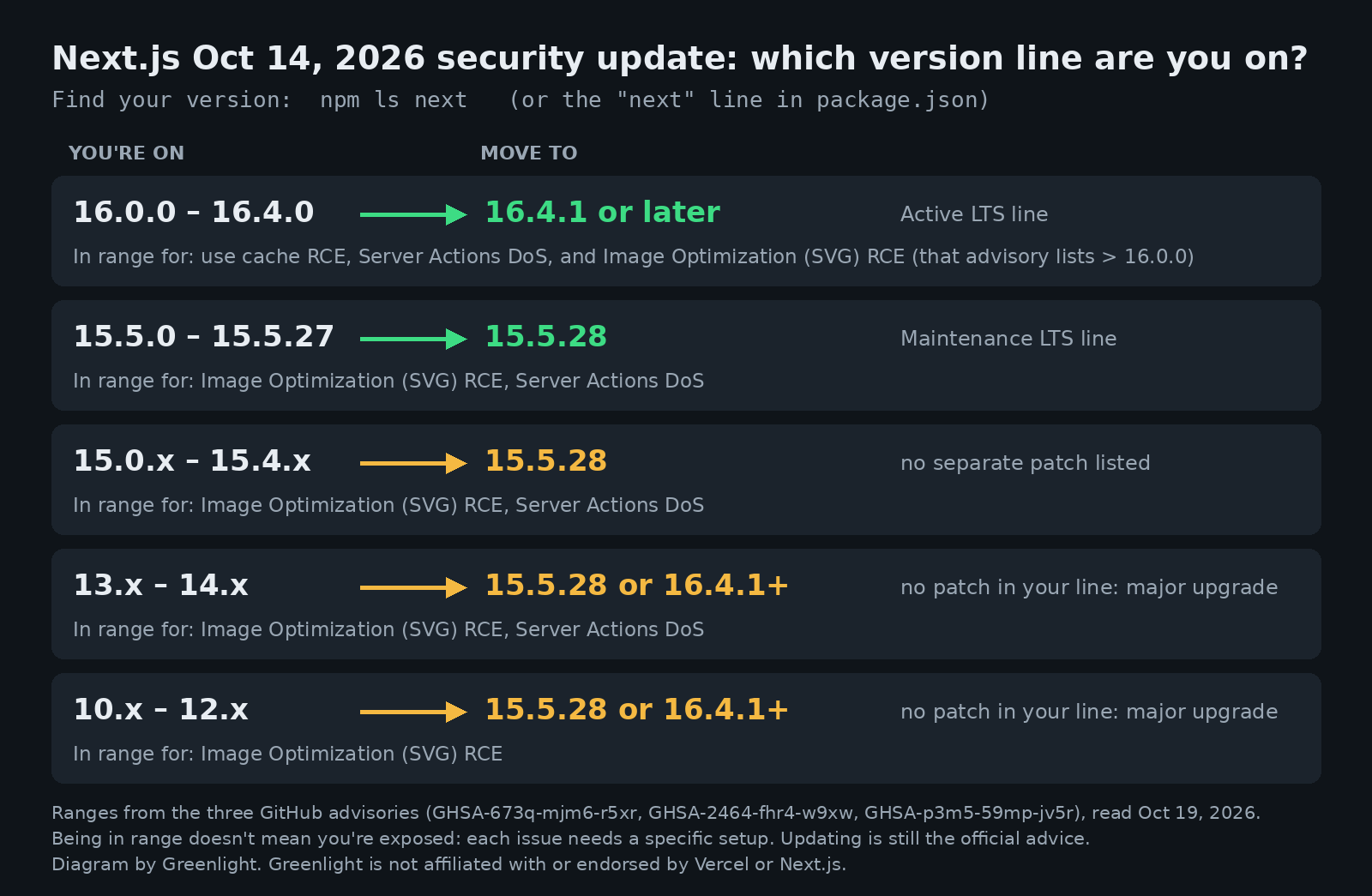
Our diagram, built from the version ranges in the three GitHub advisories (read Oct 19, 2026).
| You're on | Move to | Notes |
|---|---|---|
| 16.0.0 – 16.4.0 | 16.4.1 or later | Same major version. Next.js calls 16.4 the Active LTS line. |
| 15.5.0 – 15.5.27 | 15.5.28 | Same minor line. Next.js calls 15.5 the Maintenance LTS line. |
| 15.0 – 15.4 | 15.5.28 | No separate patch is listed for these, so move up to 15.5.28. |
| 14.x and older | 15.5.28 or 16.4.1+ | The advisories list no patched 14.x (or older) release. Moving up is a major-version upgrade (see Step 3). |
Being in an affected range doesn't automatically mean your app can be attacked through each issue; each one needs a specific setup, listed above. Next.js still says to upgrade.
Step 3: Update
If you're on 16.x or 15.5.x, it's one command, from the official post:
npm install next@16.4.1   # for 16.4 (or a later 16.4.x)
npm install next@15.5.28  # for 15.5
If you use eslint-config-next, update it to the same version.
If you're on 14.x or older, this is a real upgrade, not a patch. Next.js 15 needs React 19 and changes some APIs (for example, params, searchParams, cookies() and headers() become async). Follow the official upgrade guide for version 15 (external), which includes an upgrade codemod (npx @next/codemod@canary upgrade latest), and the general upgrading guide (external). Do it on a branch and test before you deploy.
What happened when we tried it
We ran the update on a throwaway scratch copy of one of our own Next.js 14 App Router projects on Oct 19, 2026. We didn't deploy it.
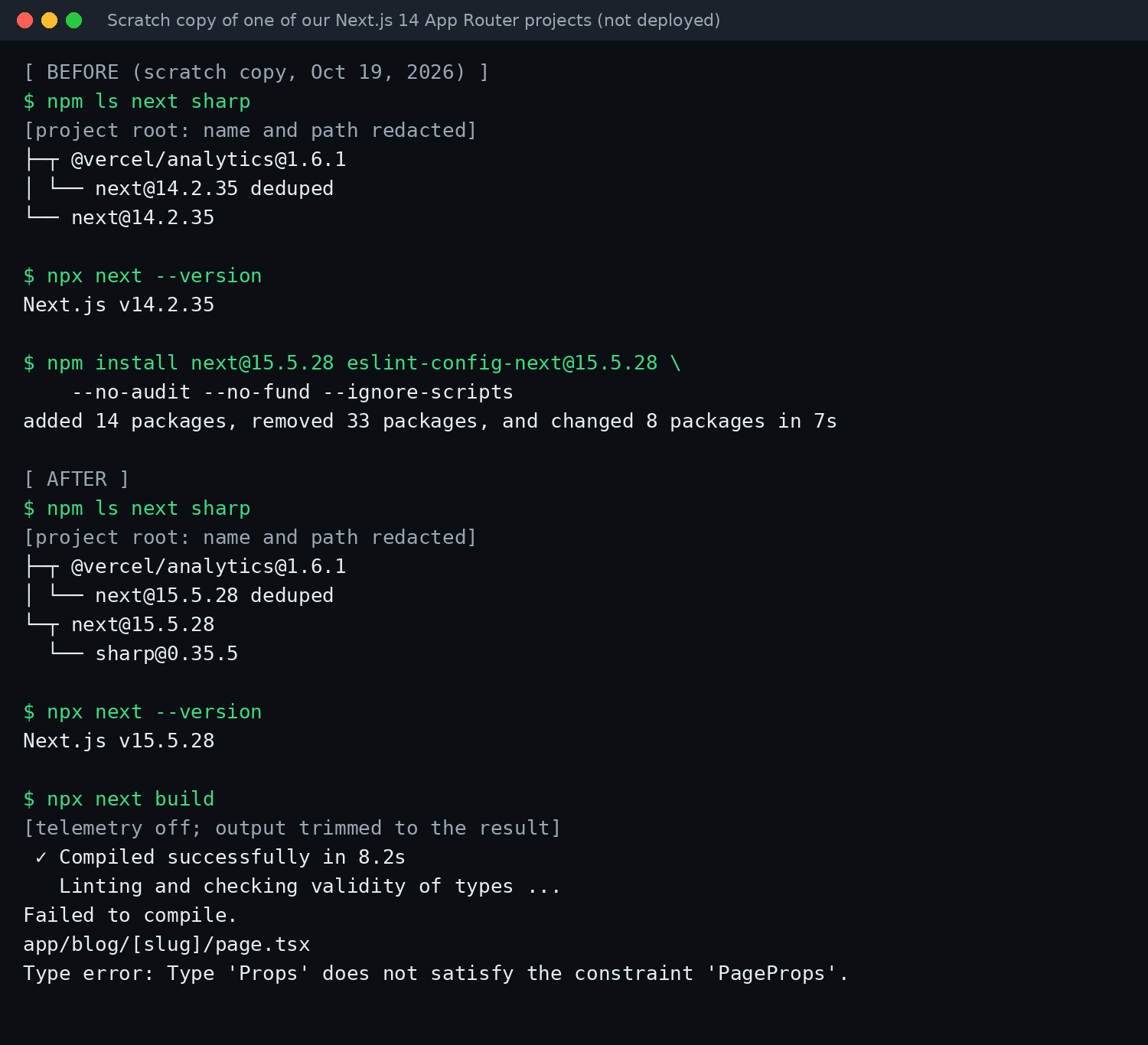
Our own terminal output. The project name and path are redacted, and the build output is trimmed to its result.
- Before:
next@14.2.35, with nosharpinstalled. - After the install:
next@15.5.28, and npm pulled insharp@0.35.5, which matches the advisory's workaround version. - The build failed. The type check stopped on a page that reads
paramsthe old, synchronous way, which is the Next.js 15 async change. The upgrade guide's codemod is meant for exactly this. (We also kept React 18 in this quick test; the guide says Next.js 15 needs React 19.)
The lesson: if you're on 14 or older, budget time for the upgrade and test the build before you redeploy. A version number changing in package.json isn't the same as a working, patched app.
Step 4: Rebuild, redeploy and confirm
- Commit the updated
package.jsonand your lockfile (package-lock.json,pnpm-lock.yaml,yarn.lockorbun.lockb). - Run your build locally (
npm run build) and fix any errors. - Redeploy. The fix only applies once the new build is the one serving your site.
- Confirm with
npm ls next sharp:nextshould be 16.4.1 or later, or 15.5.28, and ifsharpis listed it should be 0.35.5 or later. Package ranges can let an older lockfile keep an oldersharp, so it's worth looking.
Then run a free Greenlight check on your live site, and look at your security headers while you're at it.
FAQ
Is my app affected if I don't use Next.js?
Not by these three Next.js advisories, which are for the next package. If your app uses React Server Components through another framework or bundler, check the two related React advisories linked above.
I'm on 16.4.2. Do I need to do anything? No action for these three issues: 16.4.2 is later than the patched 16.4.1. Keep updating as new releases come out.
I don't use Server Actions or use cache. Can I skip it?
Next.js says to upgrade even if your app doesn't have the use cache pattern, and the Image Optimization issue isn't tied to either feature. Upgrading is the simple answer.
What if I can't upgrade from 14 right now?
The only workaround the advisories list is for the Image Optimization issue: make sure the sharp used by Next.js is 0.35.5 or later. The use cache issue doesn't affect 14.x, and the Server Actions issue has no workaround besides upgrading. Plan the upgrade.
Does Greenlight check for this? No. Greenlight's free scan checks the basics from the outside (HTTPS, security headers, exposed keys). It doesn't read your Next.js version.
Paid reports: coming soon.
Sources
- Next.js blog, Next.js security update, Oct 14, 2026 (external)
- GitHub advisory GHSA-673q-mjm6-r5xr (use cache typed arrays RCE, critical) (external)
- GitHub advisory GHSA-2464-fhr4-w9xw (Image Optimization SVG RCE, critical per the advisory; CVE-2026-96889 per the Next.js post, CVE record rated 7.8 High) (external)
- GitHub advisory GHSA-p3m5-59mp-jv5r (Server Actions DoS, high) (external)
- React advisory GHSA-xqc2-xf4c-x3h3 (external)
- React advisory GHSA-h3gv-c5rc-p453 (external)
- CVE record CVE-2026-96889 (external)
- Next.js docs, Upgrading (external)
- Next.js docs, Upgrading to version 15 (external)
On this site
Greenlight is independent and not affiliated with or endorsed by Vercel, Next.js, React, GitHub, Cursor, Anthropic (Claude Code), Bolt or Lovable. Product names are used only to identify the tools and frameworks this guide is about. This page is general information, not professional security advice, legal advice, a security audit or a guarantee. Check your own setup against the vendor's current docs.